
 0/15
0/15 0/12
0/1202 Flappy Bird
Today’s Goal

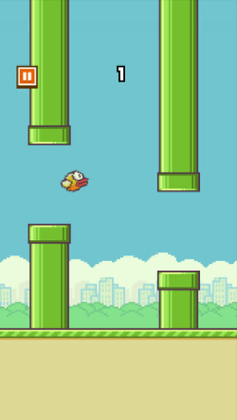
Section titled “Today’s Goal”Make an endless flying game, like Flappy Bird: flap to stay in the air, and fly through the gaps between the pipes.
Pong worked, but everything lived in Game1, and the game’s mode was a string. This
session is about structuring the code before the game gets any bigger. We start
GARCore, a class library for the code every game needs, which grows through the rest of
the course. And we replace the string with a state machine.
Other new things in this session are textures, parallax scrolling, procedural generation, interfaces and the Singleton pattern.
Source code: gar-games/02-flappy-bird
Prepare
Section titled “Prepare”- Architecture, Performance, and Games
- Singleton
- 06: Working with Textures
- Optional: 04: Creating a Class Library, for background. It creates the library with the MonoGame templates; ours comes ready in the gar-starter template (exercise 1).
- Optional: Content Builder Project,
the reference for
Builder.cs - Optional: Interfaces (C#), if you want to refresh them before the state machine
Game Architecture
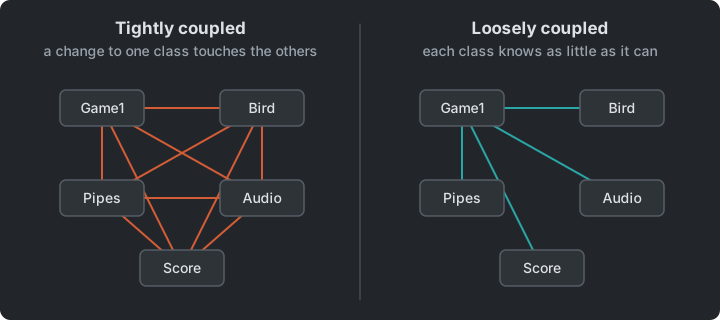
Section titled “Game Architecture”Good software architecture makes change cheap. Much of that comes from decoupling. When you change one part of the code, you shouldn’t have to understand or touch many other parts.
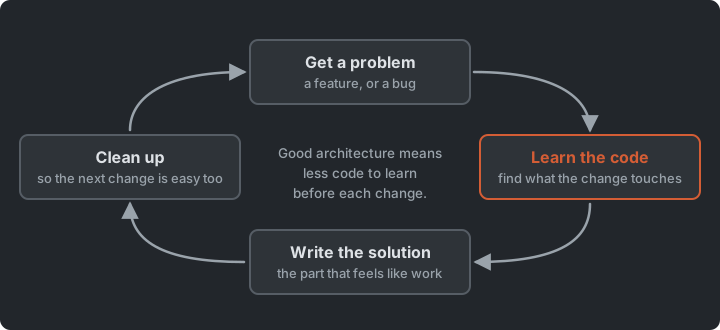
- Coupling: how much one module depends on another. Aim for low.
- Cohesion: how closely related the responsibilities inside one module are. Aim for high.
Cheap change is the quality we come back to most. A few others turn up through the course:
- Easy to understand: someone new to the code can find where things happen.
- Testable: the rules of the game can run without a window or a keyboard.
- Driven by data: levels, enemy types and other things that change often live in files.
- Fast enough: the game holds its frame rate with as many things on screen as it needs.
Decoupling isn’t free. Abstractions cost time to write and understand, and sometimes cost performance. Good architecture is about choosing where flexibility is worth that cost.
Class Libraries: GARCore
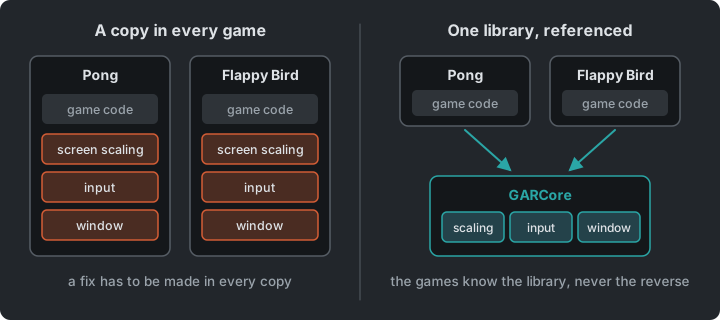
Section titled “Class Libraries: GARCore”Code that isn’t specific to one game (screen scaling, input helpers, and later sprites,
tilemaps, state machines…) goes into an ordinary .NET class library, GARCore, that
references MonoGame. Each game references the library, and its Game1 derives from
Core instead of Game.
The reference only goes one way. Flappy uses GARCore, but nothing in GARCore may use a
class from Flappy. If Core needed Flappy’s Bird, no other game could use the library.
classDiagram
    class Game
    class Core {
        #GraphicsDeviceManager Graphics
        #SpriteBatch SpriteBatch
        +InputManager Input$
        +Core(title, windowW, windowH, virtualW, virtualH)
        #UpdateScreenScaleMatrix()
    }
    class Game1
    Game <|-- Core
    Core <|-- Game1
    note for Core "GARCore library"
    note for Game1 "Flappy project"
From now on we ask the same question in every session. Does this code belong to the game, or to the core?
Images & Parallax Scrolling
Section titled “Images & Parallax Scrolling”An image is just a Texture2D, loaded with Content.Load<Texture2D>() and drawn with
SpriteBatch.Draw().
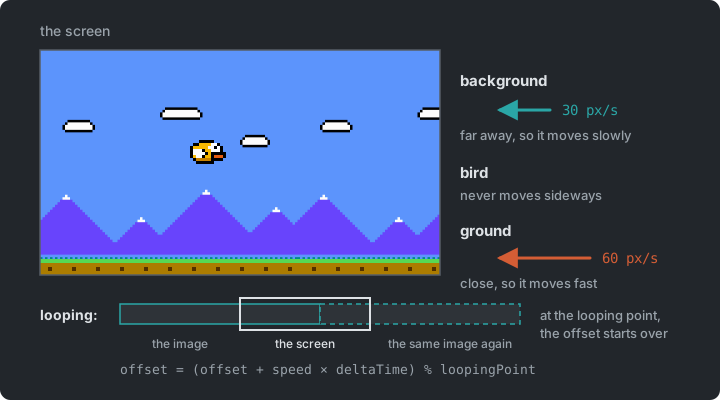
Parallax scrolling creates an illusion of depth by moving layers at different speeds:
the background scrolls slower than the ground. Each layer loops by wrapping its offset
with % at its “looping point”.
The bird never actually moves sideways. The world scrolls past it, and the player sees a bird flying.
Steps Flappy0 → Flappy2
Flappy1 draws the background and the ground; Flappy2 scrolls them, the background at 30
pixels per second and the ground at 60, looping at 412 and 512.
Try it (Flappy2): make the ground scroll at 120 and the background at 15. Then swap the
two speeds. What happens to the sense of depth?
Where Do Assets Live?
Section titled “Where Do Assets Live?”How does the Bird class get its texture? There are several options, each with a
trade-off:
- A
public staticfield onGame1: easy, but breaks encapsulation and bloatsGame1. - Inject the
Texture2D(orContentManager) into each entity: explicit, but tedious. - A static
ContentManageronCore: global access to loading. - A static
Artclass holding references to all loaded assets.
We use option 4 today. It is global state, and the Singleton section below discusses what that costs.
Input: InputManager
Section titled “Input: InputManager”The “was just pressed” check from Pong moves into GARCore as a KeyboardInfo class
(IsKeyDown, IsKeyUp, WasKeyJustPressed, WasKeyJustReleased). A MouseInfo class does
the same for the mouse (IsLeftButtonDown, WasLeftButtonJustPressed, Position). Both are
wrapped by an InputManager that Core updates every frame, so any code can ask
Core.Input.Keyboard or Core.Input.Mouse.
Steps Flappy3 → Flappy5
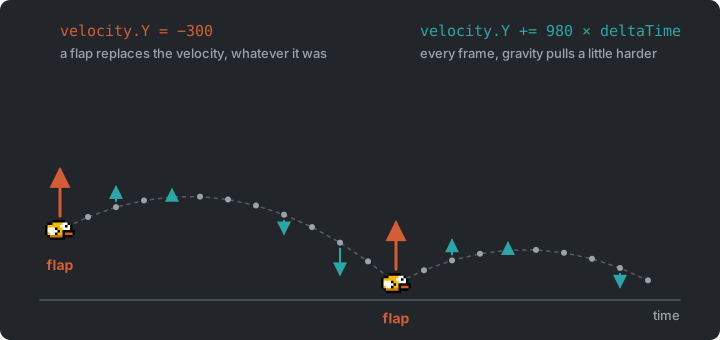
Flappy4 adds gravity: the bird’s vertical velocity grows by 980 pixels per second every
second, and its position follows the velocity, both scaled by delta time. Flappy5 adds the
input classes, and the bird flaps on Space or a left click. A flap sets the vertical
velocity to 300 upwards.
The mouse position is in window coordinates. Because the game is drawn at a virtual resolution and scaled to the window, a click at the window’s centre is not at (320, 180) in the game unless you convert it. We don’t need positions for Flappy Bird, but several later games have to convert between coordinate spaces like this.
Try it (Flappy5): in Bird, set the gravity to 1500 and the jump force to 450. Make the
Up key flap too. Then swap WasKeyJustPressed for IsKeyDown. What does holding Space do
now?
Procedural Generation
Section titled “Procedural Generation”Steps Flappy5 → Flappy7
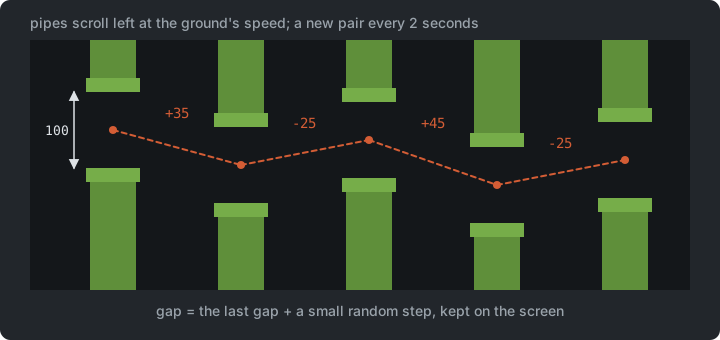
Instead of designing levels by hand, we generate them with code. Flappy6 spawns a pipe every
2 seconds at a random height, scrolling at the ground’s speed. Flappy7 wraps two pipes in a
PipePair with a 100-pixel gap, and lets the gap drift. Each pair’s height is the previous
pair’s plus a small random step, clamped to the screen. Pairs that scroll off-screen are
flagged and removed.
Try it (Flappy7): make the gap 80 pixels and spawn a pair every 1.5 seconds. Is it still
fair? Which numbers in SpawnPipePair make the drift gentler?
State Machines
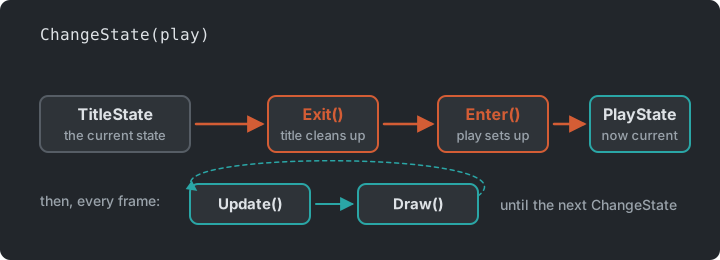
Section titled “State Machines”In Pong, the state was a string. Every Update and Draw was an if-chain over the
states, and adding a state meant editing all of them. Now each state becomes an object
that implements a common interface:
stateDiagram-v2
    [*] --> Title
    Title --> Countdown : Enter
    Countdown --> Play : 3, 2, 1...
    Play --> Score : Collision
    Score --> Countdown : Space
public interface IState{ void Enter(); void Exit(); void Update(GameTime gameTime); void Draw(SpriteBatch spriteBatch);}public class StateMachine(Game1 game){ private IState _currentState;
public TitleState TitleState { get; private set; } = new TitleState(game); public PlayState PlayState { get; private set; } = new PlayState(game);
public void ChangeState(IState newState) { _currentState?.Exit(); _currentState = newState; _currentState.Enter(); }
public void Update(GameTime gameTime) { _currentState?.Update(gameTime); }
public void Draw(SpriteBatch spriteBatch) { _currentState?.Draw(spriteBatch); }}Each state contains only its own behaviour, and Game1 passes Update and Draw on to
the state machine. Enter() and Exit() give each state a place to set up and clean up
(for example, PlayState.Enter() resets the bird, pipes and score so every retry starts
clean).
Passing data, and a countdown
Section titled “Passing data, and a countdown”Steps Flappy9 → Flappy11
Flappy10 scores a point for each pair the bird passes, and adds a ScoreState. The score
state needs the score, which belongs to the play state, so it reads it through the state machine
(game.GameState.PlayState.Score). Flappy11 adds a CountdownState between the title or
score and play: 3, 2, 1, then play.
Try it (Flappy11): make the countdown start at 5 and tick every 0.3 seconds. Then show a
best score on the score screen. Where does the best score live, so that it survives the next
game?
This is a game-level state machine. In Pac-Man we apply the same idea to objects in the game (the State pattern), and in Pokemon we stack states on top of each other.
Singleton Pattern
Section titled “Singleton Pattern”“Ensure a class has one instance, and provide a global point of access to it.” — Gang of Four, Design Patterns
public class Singleton{    private static Singleton _instance;    public static Singleton Instance => _instance ??= new Singleton();
    private Singleton() { }}
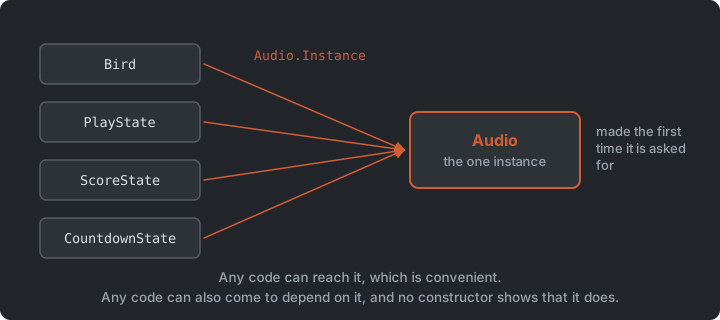
Singletons are everywhere in game code because they are convenient. They are also controversial:
- They are global state: any code can reach them, so any code can depend on them.
- Dependencies become hidden, which makes code hard to reason about and to test.
- Games rarely need to guarantee “only one instance”. Usually we only want easy access.
“Friends don’t let friends create singletons.” — Robert Nystrom, Game Programming Patterns
In the finished game (Flappy12), Audio is a Singleton, used as
Audio.Instance.PlayFlap(), while Art and Core.Input are static. Both give global
access, but Audio is an object, so it could implement an interface or be passed to the
code that needs it.
Discuss: do Audio and Art have the same problems? Which one would be easier to
replace with a muted version for testing? Pokemon picks this up again
with the Service Locator pattern.
The Whole Game
Section titled “The Whole Game”Step Flappy12
Flappy12 adds the music and the sounds, and is the finished game. Game1 derives from
Core, scrolls the background and the ground, and hands Update and Draw to the state
machine. The play state owns the bird and the pipes.
classDiagram
    Core <|-- Game1
    Game1 --> StateMachine
    StateMachine --> IState : current
    IState <|.. TitleState
    IState <|.. CountdownState
    IState <|.. PlayState
    IState <|.. ScoreState
    PlayState --> Bird
    PlayState --> PipePair : many
    PipePair --> Pipe : two
    Bird ..> Art
    Bird ..> Audio
The dotted lines to Art and Audio are the global access from the last section. Nothing
hands them to the bird. It reaches for them.
Summary
Section titled “Summary”| Concern | Answer |
|---|---|
| How cheap a change is | Low coupling and high cohesion |
| Code that every game needs | A class library, GARCore |
| Which screen the game is on | A state machine of IState objects |
| Levels nobody drew | Procedural generation |
| Depth on a flat screen | Parallax scrolling |
| Reaching the audio from anywhere | Singleton, and what it costs |
Exercises
Section titled “Exercises”- A class library: create your own repository from the
gar-starter template, and rename
MyGametoFlappy(its README shows how). It comes with an empty class library,GARCore. Find the two places that connect it to the game: theProjectReferenceinFlappy.csprojand the line in the.slnx. Which way does the reference point? Then write aCoreclass inGARCore, deriving fromGame: move the screen scaling from Pong into it, with a constructor taking title, window size and virtual size. Nothing in it may mention Flappy. - A game on the library: derive
Game1fromCore, with a 640×360 virtual resolution in a 1280×720 window (2×, so every pixel is the same size). - The bird and the Art class: bring your game up to
Flappy2: copy theimagesfolder fromgar-games/02-flappy-bird/Content/Assetsinto yourContent/Assets(later, copyfontsandaudiothe same way; the starter’s builder already handles all of them), and the drawing and scrolling fromFlappy2’sGame1. Then add aBirdclass and a staticArtclass for asset references. - Hitboxes: bring your game up to
Flappy7(gravity inBird, the input classes in GARCore, thePipeandPipePairclasses and the spawning inGame1), then stop the game when the bird hits a pipe, the ground or the ceiling. Can you make collisions more forgiving? - A state machine: add
IState, aStateMachine, aTitleStateand aPlayState. What goes inPlayState’sEnter, and what would go wrong if it ran in the constructor instead? Compare with Pong’s string field: where is the code for one mode now? - Audio as a Singleton: bring your game up to
Flappy11(the score and countdown states), then add background music (Song+MediaPlayer.Play) and flap, hurt and score sounds, organized in anAudioclass made a Singleton (Audio.Instance.PlayFlap()). Then list the classes that useAudio. Could you have found them from their constructors? What would you have to change to runPlayStatewithout sound?
Going further (optional): a cave flyer. Hold the button to rise and let go to fall, through a cave whose ceiling and floor are generated as you go. What changes, and what stays: the states, the scrolling, the spawning?
Apply It to Your Project
Section titled “Apply It to Your Project”- Which code in your game could be reused by another game? That belongs in a class library, like GARCore.
- Which states does your game have (title, play, pause, game over)? Draw them as a state diagram, with what triggers each transition.
- Is anything in your game global? Does it need to be?
Check Yourself
Section titled “Check Yourself”What problem does a state machine solve compared to a string or enum field?
Each state’s behaviour is in one place. You can add a
state without editing the others, and Enter/Exit give reliable places for setup and
cleanup.
What happens if you forget to call Exit() when switching state?
Anything the old state set up is never cleaned up. Music keeps playing, event subscriptions stay alive and timers keep running.
Why is Singleton considered an anti-pattern by many game programmers?
It is global state. It hides dependencies, couples code together and makes testing and reasoning harder, and games rarely need the guarantee of a single instance.
What are coupling and cohesion, and which way should each go?
Coupling is how much one module depends on another, and it should be low. Cohesion is how closely related the responsibilities inside one module are, and it should be high. Together they decide how much code a change touches.
Why may nothing in GARCore use a class from the game?
The reference goes one way, from the game to the library. A Core that needed Flappy’s
Bird could not be used by any other game.