
 0/14
0/14 0/12
0/1210 Pokemon
Today’s Goal

Section titled “Today’s Goal”Make a turn-based role-playing game, like Pokemon: walk through the tall grass, meet wild monsters, and battle them turn by turn.
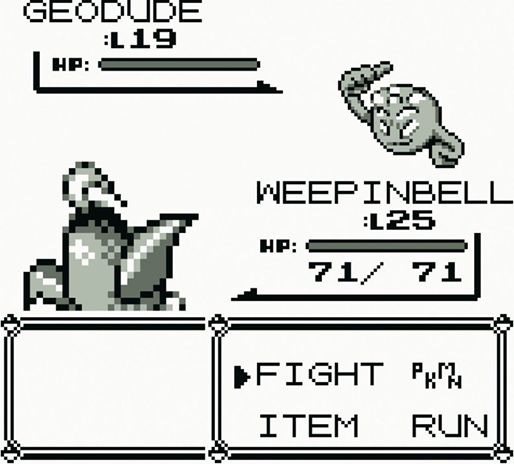
An RPG has many screens, and they sit on top of each other. A menu opens over the overworld, a battle starts, a dialogue box pops up in the battle. This session is about scenes and UI. We keep the screens on a stack, and build them from reusable UI widgets.
We also separate the UI from the game data, write turn-based battles, meet the Service Locator pattern, and add saving and loading.
Source code: gar-games/10-pokemon
Prepare
Section titled “Prepare”- 19: User Interface Fundamentals
- Pushdown Automata
- Service Locator
- Optional: Components & Services in MonoGame,
on MonoGame’s built-in locator,
Game.Services
Explore the Codebase
Section titled “Explore the Codebase”Take about 10 minutes with the finished game, Pokemon4:
- Clone, build and play the game. Go through a few encounters to level up your monster.
- How is the codebase split between the core library and the Pokemon-specific project?
As a rule of thumb, a class that mentions monsters, grass, battles or levelling belongs to the game. A class you could use unchanged in another game (the state stack, the tweens, a panel, a progress bar) belongs to GARCore.
State Stack
Section titled “State Stack”Steps Pokemon1 → Pokemon2
A finite state machine has one current state at a time. A state stack (a pushdown automaton) lets us push a state on top of others and pop it to return to where we were.
- Only the top state receives
Update. - All states draw, bottom to top, so states underneath stay visible.
This lets us layer screens:
- Fades: push a colour overlay, animate it, pop it.
- Dialogue: a message box sits on top of the battle scene.
- Battles: the field (
PlayState) is still there, untouched, when the battle ends.
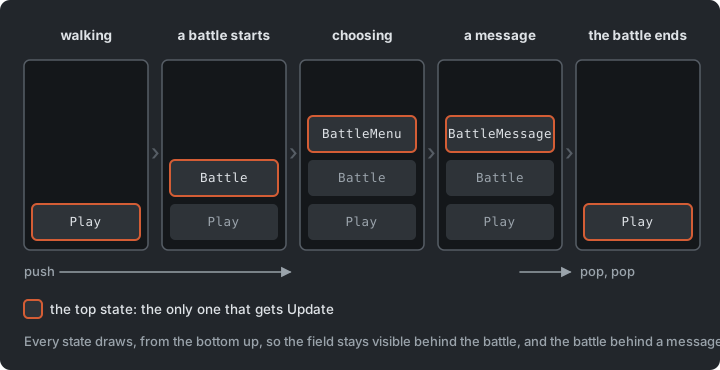
The stack itself is short, and nothing in it is about monsters, so it lives in GARCore:
public void Push(GameStateBase state){    _states.Add(state);    state.Enter();}
public void Pop(){    if (_states.Count == 0) return;    int last = _states.Count - 1;    var top = _states[last];    _states.RemoveAt(last);    top.Exit();}
// Update only the top-most state.public void Update(GameTime gameTime){    if (_states.Count > 0)        _states[^1].Update(gameTime);}
// Render all states from bottom to top.public void Draw(SpriteBatch spriteBatch){    foreach (var state in _states)        state.Draw(spriteBatch);}
A random encounter is three pushes. A fade to white goes on top of the field. When it is done, the battle goes on the stack, with a fade from white above it:
_stateStack.Push(new FadeState(_stateStack, Color.White, GameSettings.FadeDuration, 0f, 1f, () => { _stateStack.Push(new BattleState(_player, _stateStack)); _stateStack.Push(new FadeState(_stateStack, Color.White, GameSettings.FadeDuration, 1f, 0f, () => { })); }));Each FadeState pops itself when it is done. PlayState is never told that a battle
started. It stops getting Update because it is no longer on top.
Trace it
Section titled “Trace it”Files: StateStack.cs, BattleState.cs, BattleMenuState.cs, FadeState.cs
- A battle just triggered. List every state on the stack (bottom to top) once
BattleMenuStateis showing. Which state getsUpdate? Which states stillDraw? FadeStatepushes itself on top, animates, then pops. What would break if it replaced the current state instead?- Design a
PauseState. Where do you push and pop it?
Try it (Pokemon4): in PlayState.Update, push a DialogueState with a message of your
own when M is pressed (Core.Input.Keyboard.WasKeyJustPressed(Keys.M)). When you dismiss
it, where does the game carry on, and what did PlayState need to know?
Tweens Everywhere
Section titled “Tweens Everywhere”Step Pokemon0 onwards
Pokemon leans heavily on the tween system from Zelda:
walking between tiles, fades, the HP bar. A battle attack is a chain of tweens: pause →
lunge → hit sound → blink → HP bar drops. Each step’s .Finish() starts the next, and a
callback can push or pop a state, with no if/else chain.
This is the last step of an attack. The earlier steps are nested around it in the same way:
// Step 4: apply damage and animate the health bar droppingdefenderSprite.Blinking = false;int dmg = attacker.CalcDamageTo(defender, move);float targetHp = Math.Max(0, defender.CurrentHp - dmg);
Locator.Tweens.Tween(GameSettings.HpTweenDuration)    .Add(v => defenderBar.Value = v, defenderBar.Value, targetHp)    .Finish(() =>    {        defender.CurrentHp = (int)targetHp;        onEnd();    });
A tween doesn’t block. The code that starts it carries on at once, so “do this, then that” is written as a callback that starts the next step when the current one finishes.
Two details make this safe:
- Order of updates: every frame, the game updates the tweens before the state stack. A tween that finishes and pushes a state has done so before the states run, so the new state is live in the same frame.
- New tweens wait a frame: a callback that starts a tween doesn’t add it to the list that is being updated; the manager adds new tweens at the start of the next update. Changing a list while looping over it is a classic bug (see the re-entrancy pitfall in Zelda).
Try it (Pokemon4): in GameSettings, make the fades twice as slow and the walk between
tiles twice as fast. Did any state change?
Steps Pokemon1 → Pokemon2
A GUI is built from reusable widgets:
- Panel: background box for all UI
- ProgressBar: fills based on current/max (HP, EXP)
- Textbox: wraps text in a panel and pages through it on Confirm
- Selection/Menu: a list of labelled options with actions; handles navigation and the cursor. Adding an option is one line.
For inspiration, see Interface in Game.
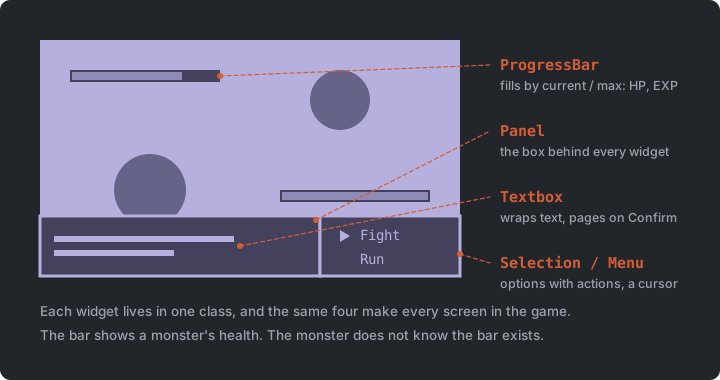
The battle menu is a Menu with two options. Each option is a label and a method to call:
_menu = new Menu( menuPos.X, menuPos.Y, 96, 64, new List<Selection.MenuItem> { new("Fight", OnFightSelected), new("Run", OnRunSelected) }, Locator.Assets.MediumFont, Locator.Assets.CursorTex);UI samples
Section titled “UI samples”Project UiSamples
Next to the steps, UiSamples puts the widgets on one screen, each on its own. There is a menu whose
options do something you can see, a panel, a progress bar that tweens to its new value, and
a textbox that pages through a message. While the textbox is open, it has the input to
itself and the menu waits. Only one widget at a time listens to the keys, the one with the
focus. The samples use the game’s own widgets, so what you change there changes in the
game too. Run them with dotnet run --project UiSamples.
Try it (UiSamples): add a fifth option that fills the bar again, and make the bar turn
red when it drops below a quarter. Which class did each change need?
When to use a UI library
Section titled “When to use a UI library”Our widgets are small enough to read in one sitting, and building them shows what a UI needs: drawing, layout, input and focus. A library such as Gum does all of that for you, and adds layouts that adapt to the screen, scrolling lists, text input, and a visual editor (customizing it). The cost is a dependency, and a way of working you have to learn. For your project, a few menus and bars are quick to build yourself; a settings screen or an inventory with scrolling is a good reason to reach for Gum.
Separating UI from game data
Section titled “Separating UI from game data”The HP bar should show a monster’s health, but the monster shouldn’t know the HP bar exists. Keep game data and rules (the model) separate from the UI (the view), and let the view observe the model through events (see Observer). Architectural patterns such as MVP and MVVM formalize this idea.
Pokemon4 doesn’t go all the way. In the excerpt from TakeTurnState,
the turn moves the defender’s bar itself, and sets CurrentHp when the bar has arrived.
The code that runs a turn has to know that a bar exists. Exercise 6 turns
that round, with an event on Mon.
Overworld & Turn-Based Battles
Section titled “Overworld & Turn-Based Battles”Steps Pokemon0, Pokemon2 and Pokemon3
- Tile-based movement: entities have a tile position (
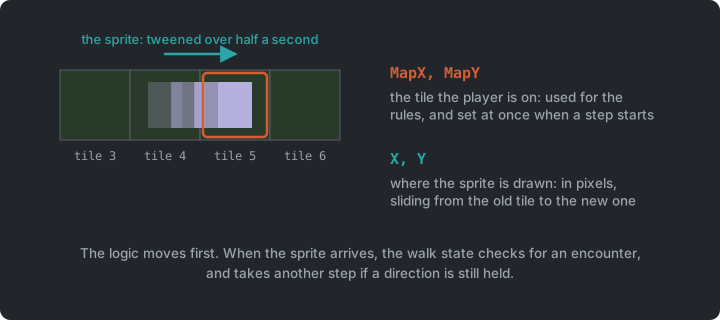
MapX/MapY, used for logic) and a pixel position (X/Y, tweened between tiles for smooth movement). The logic moves first. A step sets the new tile at once, and the sprite catches up over half a second. When it arrives, the walk state checks for an encounter, then keeps walking if a direction is still held. The town is a map of characters inTown.cs, one per tile; trees, fences, signs and houses become solid tiles, and a step onto one is refused like a step off the map. - Random encounters: each step in tall grass rolls for a battle. The transition (stop
field music, start battle music, fade, push
BattleState, fade in) is all push/pop. - Battle flow:
BattleMenuState(Fight/Run) →TakeTurnState(faster monster attacks first) → back to the menu if both are alive, otherwise victory/defeat.
Each phase of a battle is its own state, with one job:
| State | Owns |
|---|---|
BattleState |
The scene: sprites, HP and EXP bars. It stays at the bottom and keeps drawing. |
BattleMenuState |
The player’s choice |
TakeTurnState |
The order of events in one turn |
BattleMessageState |
A message on top, until the player confirms |
Each class stays small because it has one reason to change, and none of them needs to know which state comes next. They only push and pop.
RPG mechanics
Section titled “RPG mechanics”PokemonSpeciesdefines a species (name, base stats, growth rates, sprites);Monis one actual monster with its own level, stats and HP;Partyholds your team.- Stats, damage and experience are small formulas in
Mon, with no randomness, so a battle can be worked out on paper.LevelUp()returns the stat increases, so the UI can show them without knowing the formulas.
PokemonSpecies vs. Mon is the Type Object pattern again:
the species are defined in pokemon_definitions.json, as the defenders were in Plants vs.
Zombies.
Save & Load
Section titled “Save & Load”The species definitions from Pokemon0; saving is exercise 3
Serialization is converting an object into a format that can be stored or sent (JSON
text, bytes), and deserialization turns it back into an object. Loading the species
definitions with System.Text.Json is deserialization. Saving the game is the same
process in reverse:
public record SaveData(List<MonSaveData> Party, int MapX, int MapY);
string json = JsonSerializer.Serialize(saveData);File.WriteAllText(SavePath, json);
SaveData loaded = JsonSerializer.Deserialize<SaveData>(File.ReadAllText(SavePath));
Save plain data. Store what you need to rebuild the game state (species name, level, current HP), and leave out textures and references to other game objects.
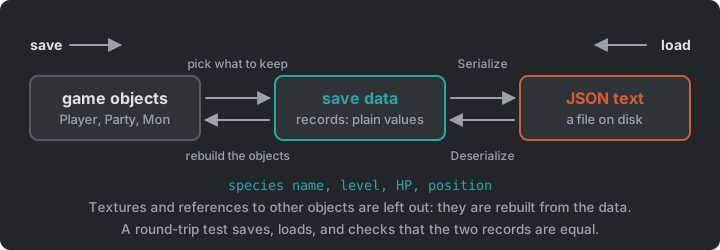
The game already reads its data this way. The JSON is deserialized into small record
types with the same shape as the file, and the game builds its real objects from those.
Records suit this well, since they are plain data, and their constructors match the JSON’s
fields.
Saving is also easy to get subtly wrong. A field you forgot to save only shows up the next time someone loads the game. A round-trip test catches it by saving some data, loading it back, and checking that you got the same values. It’s a unit test like the ones in Sokoban, and it needs no window or battle, only the save data:
[Fact]public void A_saved_party_loads_back_the_same(){    var saved = new SaveData([new MonSaveData("Cindrel", Level: 5, CurrentHp: 12)], MapX: 3, MapY: 7);
    SaveData loaded = JsonSerializer.Deserialize<SaveData>(JsonSerializer.Serialize(saved));
    Assert.Equal(saved.Party, loaded.Party);    Assert.Equal(saved.MapX, loaded.MapX);    Assert.Equal(saved.MapY, loaded.MapY);}
Service Locator
Section titled “Service Locator”Steps Pokemon0 and Pokemon4
In Flappy Bird, the audio was a Singleton, and every
caller named the one concrete Audio class. Here, from Pokemon0, a locator hands out the
tween manager and the game’s assets. In Pokemon4, audio is added as one more service:
every class that plays a sound asks the locator for an IAudio, and Game1 registers the
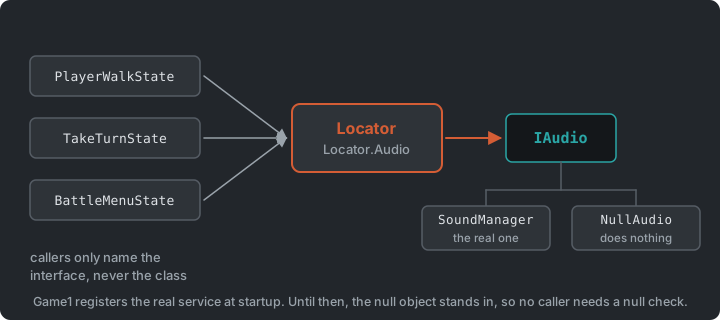
real SoundManager. The callers never name it.
Many classes need shared services such as audio, tweens and assets. There are three common ways for them to get one:
- Pass them in (dependency injection): explicit and testable, but tedious when a service is needed deep in the object graph.
- Singleton: easy, but couples every caller to one concrete class (Flappy Bird).
- Service Locator: a central registry that hands out services by interface.
public static class Locator{    public static IAudio Audio { get; private set; } = new NullAudio();    public static void Provide(IAudio audio) => Audio = audio ?? new NullAudio();}
// At startupvar audio = new SoundManager();audio.LoadContent(Content);Locator.Provide(audio);
// AnywhereLocator.Audio.PlayHit();- Callers depend only on
IAudio, so the implementation can be swapped (e.g. a logging or muted audio service). - Null object: before a real service is registered,
NullAudio(which does nothing) stands in, so callers never need null checks. - Dependencies are still hidden. You can’t see from a constructor what a class uses.
Try it (Pokemon4): in Game1, provide a NullAudio instead of the SoundManager. The
game runs silently. Which other classes did you change? Then write a LoggingAudio that
prints each sound’s name instead of playing it.
MonoGame has a built-in locator, Game.Services
(Services.AddService<IAudio>(audio), Services.GetService<IAudio>()). We roll our own
here to see how it works.
The Whole Game
Section titled “The Whole Game”Step Pokemon4
Pokemon4 registers a real audio service, and is the finished game. Game1 owns the state
stack and fills the locator. Every state is given the stack, so it can push and pop. The
field and the battle each hold their own part of the game data.
classDiagram
    Core <|-- Game1
    Game1 --> StateStack
    Game1 ..> Locator : provides the services
    StateStack --> GameStateBase : many
    GameStateBase <|-- PlayState
    GameStateBase <|-- BattleState
    GameStateBase <|-- BattleMenuState
    GameStateBase <|-- TakeTurnState
    GameStateBase <|-- FadeState
    PlayState --> Level
    Level --> Player
    Player --> Party
    Party --> Mon : many
    Mon --> PokemonSpecies
    BattleState --> Mon : two
    BattleState --> ProgressBar : three
    Locator --> IAudio
    Locator --> ITweenManager
    Locator --> GameAssets
StartState, DialogueState and BattleMessageState are left out to keep the diagram
readable. They are states on the same stack.
Summary
Section titled “Summary”| Concern | Answer |
|---|---|
| Screens on top of each other | A state stack |
| Menus, bars and text boxes | Reusable widgets |
| A bar that follows the data | The view observes the model |
| One thing after another, over time | Chains of tweens |
| Species and monsters | Type Object |
| Keeping progress | Serialization to JSON, with a round-trip test |
| Reaching shared services | Service Locator, with a null object |
Exercises
Section titled “Exercises”Start from Pokemon4.
- Trace a battle: find where the game goes from
PlayStatetoBattleState, and follow one turn from choosing Fight to the result on screen. Which states are on the stack at each point? Where is the damage calculated, and what happens when the battle ends? - A new species: add a monster that hits hard but has little defence to
pokemon_definitions.json. Its battle sprites are ready inimages/pokemon/(shardling-frontandshardling-back). Run the game and fight it. Did you need any code? - Save & load: save the player’s party and position to a JSON file (e.g. on a key
press), and load it on startup if it exists. Then add a
Pokemon.Testsproject, set up likeSokoban.Tests, with a round-trip test for your save data. - Pause: add a
PauseStateusing the state stack, built from the widgets: aPanelwith aMenuthat offers Resume and Quit (back to the title screen). Why does the field stop moving while it is open, althoughPlayStateis still on the stack? - Mute: let a key swap the audio service for a
NullAudiowhile the game runs, and back again. Which classes did you change? What happens to the music that was already playing, and to music that should have started while the game was muted? What would the same feature take with a Singleton, like theAudio.Instancein Flappy Bird? - A bar that listens: in a battle,
TakeTurnStatemoves the health bar itself. GiveMonan event that is raised when its HP changes, and letBattleStatesubscribe and tween the bar. What doesTakeTurnStateno longer need to know? Where do you unsubscribe, and what happens if you forget? - Catching (stretch): add a Catch option to the battle menu that can add a weakened wild monster to your party (more likely the lower its HP), and a field menu to choose who goes first. Which states do you add, and which existing ones change?
- Types (stretch): add a
typefield (Fire, Water or Grass) to the JSON and toPokemonSpecies, and make an attack take the defender’s type into account (super effective, or not very effective). The field is data. Where does the table of which type beats which belong: in the JSON too, or in code?
Apply It to Your Project
Section titled “Apply It to Your Project”- Would your game benefit from layered states (pause menus, dialogue, transitions)?
- Which services do many of your classes need? How do they get them today?
- What would your game need to save to resume a session later?
Check Yourself
Section titled “Check Yourself”When is a state stack better than a state machine that replaces states?
When you need to return to a previous state as you left it (a pause menu, a battle, a dialogue box), or draw several states on top of each other.
How does a Service Locator differ from a Singleton?
Callers depend on an interface, and the implementation can be swapped at runtime (e.g. a null or logging service). It is still global access, so dependencies stay hidden.
When would you prefer dependency injection over a Service Locator?
When a class has few dependencies and they are needed close to where the object is created. Constructor parameters make dependencies explicit and easy to replace in tests.
Why should the HP bar observe the monster, instead of the monster updating the bar?
The monster is game data and rules, and it should work with no UI at all, in a test or behind a different screen. When the bar subscribes to the monster, the dependency only points from the view to the model.
What is a null object, and what does NullAudio save?
An object that implements the interface and does nothing. NullAudio stands in until a
real service is registered, so callers never check for null, and providing it on purpose
mutes the game.
What belongs in a save file, and how do you check that saving works?
Plain data, enough to rebuild the state: species name, level, current HP and position. Textures and references to other objects stay out. A round-trip test saves some data, loads it back and compares the two.