
 0/12
0/12 0/12
0/1208 Angry Birds
Today’s Goal

Section titled “Today’s Goal”Make a physics puzzle game, like Angry Birds: pull back the slingshot, let go, and knock down the pigs’ huts.
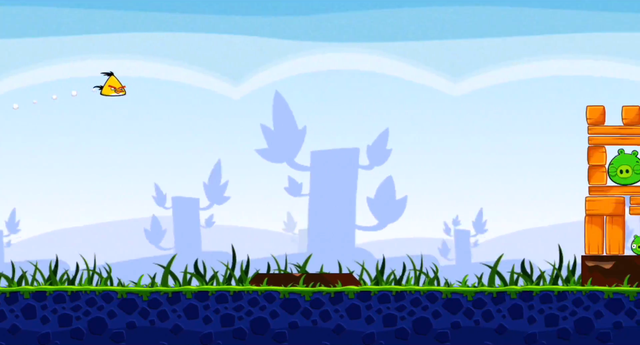

In Super Mario Bros we wrote our own physics, with gravity, velocity and collisions with tiles. That isn’t enough for stacks of blocks that tip over, bounce and break. Real games use a physics library for this, and we use Box2D. The question for this session is how to bring someone else’s library into the game without the rest of the code having to know about it. We look at:
- The Adapter and Facade patterns
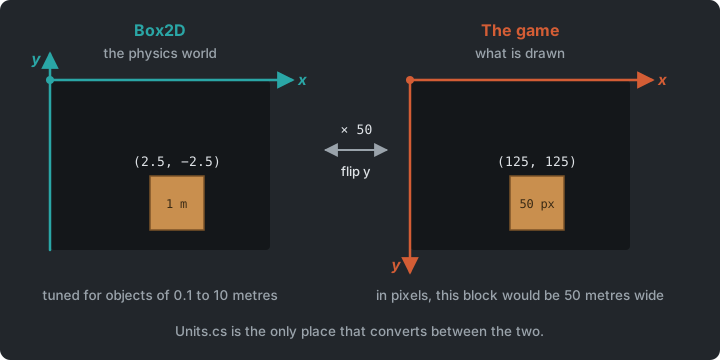
- Two worlds, the physics world (metres, y up) and the game world (pixels, y down)
- Contact events, and destroying bodies safely
- The Prototype pattern, for building levels from prefabs
Source code: gar-games/08-angry-birds
Prepare
Section titled “Prepare”- Box2D: Hello Box2D (skim: the world, bodies, shapes and stepping)
- Adapter and Facade
- Prototype (up to “What about data?”)
A Physics Library
Section titled “A Physics Library”Step Birds0
Box2D is a 2D physics engine, used in many games (Angry Birds among them). We use Box2D.NET, a C# port, added as a NuGet package:
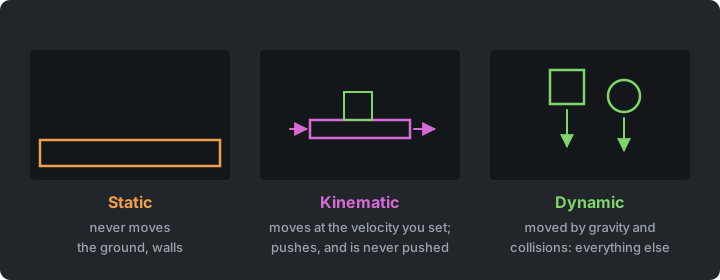
<PackageReference Include="Box2D.NET" Version="3.1.*" />Box2D simulates a world of bodies. Each body has one or more shapes (boxes, circles, polygons), with a density, friction and bounciness. There are three types of body:
- Static bodies never move, like the ground and walls.
- Kinematic bodies move at the velocity you give them, push dynamic bodies, and are never pushed back. A moving platform is one.
- Dynamic bodies are moved by gravity and collisions. That is everything else.
You step the world forward in time, and read where the bodies ended up.
Birds0 uses Box2D directly, in Game1:
private void AddBox(float x, float y, float width, float height, string sprite){    B2BodyDef bodyDef = b2DefaultBodyDef();    bodyDef.type = B2BodyType.b2_dynamicBody;    bodyDef.position = new B2Vec2(x / PixelsPerMeter, -y / PixelsPerMeter);    B2BodyId body = b2CreateBody(_world, in bodyDef);
    B2Polygon box = b2MakeBox(width / 2 / PixelsPerMeter, height / 2 / PixelsPerMeter);    B2ShapeDef shapeDef = b2DefaultShapeDef();    shapeDef.material.friction = 0.6f;    b2CreatePolygonShape(body, in shapeDef, in box);
    _bodies.Add((body, _atlas.GetRegion(sprite)));}
It works, but Game1 now has to know a lot about Box2D:
- A foreign API. Box2D is written in C, and the port keeps its style, with functions like
b2CreateBodyinstead of methods, structs passed within, and IDs (B2BodyId) instead of objects. - Another world’s units. Box2D works in metres, with y pointing up. Our game
works in pixels, with y pointing down. So every position that crosses between the
two is divided or multiplied by
PixelsPerMeter, and its y is flipped. That happens when creating a body, when launching the bird, and every frame when drawing. Box2D also turns counter-clockwise, and SpriteBatch clockwise. Forget one conversion, and a body appears in the wrong place, or falls up. - Spread through the game. Box2D’s types and conversions are all over
Game1. Moving to another physics library, or to a new version of this one, would mean changing all of it.
Box2D is made for scale: 1 unit should be about 1 metre, and objects should be roughly 0.1 to 10 units in size. In pixels, a 50-pixel block would be a 50-metre block, and it would fall as slowly as a building, which is why the conversion is needed at all.
Try it (Birds0): change PixelsPerMeter from 50 to 10. How many lines use it, and
how do the blocks fall now?
Adapter & Facade
Section titled “Adapter & Facade”Step Birds1
Birds1 puts Box2D behind two classes of our own, in the Physics folder. The rest of the
game never sees a Box2D type again.
classDiagram
    class Game1
    class Entity {
        +PhysicsBody Body
        +Draw(spriteBatch)
    }
    class PhysicsWorld {
        +CreateBox(center, size, rotation, material, owner, type) PhysicsBody
        +CreateCircle(center, radius, material, owner) PhysicsBody
        +Hinge(a, b, anchor) PhysicsJoint
        +Update(deltaSeconds)
        +Destroy(body)
    }
    class PhysicsBody {
        +Vector2 Position
        +float Rotation
        +Vector2 Velocity
        +object Owner
    }
    class Box2D {
        <<library>>
        b2CreateWorld()
        b2CreateBody()
        b2World_Step()
        b2Body_GetPosition()
    }
    Game1 --> PhysicsWorld
    Game1 --> Entity
    Entity --> PhysicsBody
    PhysicsWorld ..> Box2D
    PhysicsBody ..> Box2D
Two patterns are at work here:
- An Adapter converts the interface of a class into the interface its users expect.
PhysicsBodywraps aB2BodyId, and gives the game what it wants: a position in pixels, a rotation that turns the same way as SpriteBatch, and a velocity it can set. - A Facade puts one simple interface in front of a complicated subsystem. Box2D has
hundreds of functions; the game needs a handful.
PhysicsWorldoffers only those: creating a box or a circle, stepping the world, and destroying a body.
public sealed class PhysicsBody{    internal B2BodyId Id { get; }    public object Owner { get; }
    public Vector2 Position => Units.ToPixels(b2Body_GetPosition(Id));
    // Box2D turns counter-clockwise, SpriteBatch clockwise.    public float Rotation    {        get        {            B2Rot rotation = b2Body_GetRotation(Id);            return -b2Rot_GetAngle(in rotation);        }    }}
And every conversion between the two worlds is in one place:
internal static class Units{    public const float PixelsPerMeter = 50;
    public static B2Vec2 ToMeters(Vector2 pixels) => new(pixels.X / PixelsPerMeter, -pixels.Y / PixelsPerMeter);    public static Vector2 ToPixels(B2Vec2 meters) => new(meters.X * PixelsPerMeter, -meters.Y * PixelsPerMeter);}
Now the game reads like our game again:
public Block(PhysicsWorld world, Vector2 center, Vector2 size, float rotation, PhysicsMaterial material, TextureRegion sprite) : base(sprite){ Body = world.CreateBox(center, size, rotation, material, this);}A new version of Box2D, or another physics library, now means changing the Physics folder
only. Nothing outside that folder has to think in metres, because the adapter speaks pixels,
clockwise rotations and our own types. And since the facade only offers what the game needs,
the game can’t come to depend on the rest of Box2D.
The cost is that every Box2D feature the game needs later (joints, raycasts, sensors) has
to be added to the facade first. That is on purpose, but it is extra work. Kinematic bodies
and joints are examples. The game didn’t need them, but the physics samples did, so CreateBox
got a BodyType instead of an isStatic flag, and PhysicsWorld got Weld, Hinge and
Rope, in pixels like everything else.
Wrap a library when it’s foreign to your code, when you might swap it, or when you use a small part of it. A library that already fits your code, like MonoGame itself, doesn’t need it.
Units is internal, and so are the IDs. In a bigger project, the Physics folder would
be its own class library project, and internal would then really hide Box2D from the game.
Try it (Birds1): make the same change, to 10 pixels per metre. How many files did you
touch this time?
Who owns the position?
Section titled “Who owns the position?”A block now exists twice, as an Entity in our game and as a body in the physics world.
Two copies of the same position would drift apart, so one of them must own it. Here, the
physics world owns it. An entity has no position of its own, and reads its body’s
position every time it’s drawn.
public void Draw(SpriteBatch spriteBatch){ var origin = new Vector2(Sprite.Width / 2f, Sprite.Height / 2f); Sprite.Draw(spriteBatch, Body.Position, Color.White, Body.Rotation, origin, 1, SpriteEffects.None, 0);}The link goes both ways. Every body knows its owner (PhysicsBody.Owner), so when the
physics world reports something about a body, the game can find the entity it belongs to.
Debug drawing
Section titled “Debug drawing”F1 draws what the physics world sees: every body’s shape, green while it’s awake and
blue when it’s asleep (Box2D stops simulating bodies that have come to rest). It uses
GARCore’s DebugDraw.Enabled from Super Mario Bros. When a
sprite and its body don’t line up, this is where you see it.
A fixed time step
Section titled “A fixed time step”Box2D wants the same time step every time. PhysicsWorld.Update collects the frame time
and steps the world in fixed steps of 1/60 second. It is the accumulator from
Snake again.
Physics samples
Section titled “Physics samples”Project PhysicsSamples
Next to the steps, PhysicsSamples shows one idea per scene. The scenes cover the three
body types, bounce (restitution), friction, density, sleeping (bodies at rest stop being
simulated until something touches them), and joints, which hold two bodies together (a
hinge, a rope and a weld; the game uses none of them).
Keys 1 to 6 choose a scene, a click drops a box, Space drops a
ball, and R starts the scene again. The samples go through the game’s own facade, and draw
with its debug view, with static bodies orange, kinematic magenta, dynamic green, blue when
asleep, and joints yellow. Run them with dotnet run --project PhysicsSamples.
Try it (PhysicsSamples): make the platform in the first scene move up and down instead
of sideways. In the friction scene, find the lowest friction at which the box stays on the
slope. Is it what you expected for a slope of about 26 degrees? In the joints scene, hang the
tether ball from the end of the chain instead of its own hook.
Contact Events
Section titled “Contact Events”Step Birds2
Blocks should break, and pigs should pop. Box2D can report hit events, for two shapes that
touched at more than a certain speed. They’re collected during the step, and read after it.
That is an event queue, as in Zelda, kept inside
the library. After each step, PhysicsWorld drains it and turns every hit into a C# event, in
our own terms:
public event Action<PhysicsBody, PhysicsBody, float> Hit;
private void RaiseHitEvents(){    B2ContactEvents events = b2World_GetContactEvents(_world);    for (int i = 0; i < events.hitCount; i++)    {        B2ContactHitEvent hit = events.hitEvents[i];
        // A body destroyed since the step no longer has valid shapes.        if (!b2Shape_IsValid(hit.shapeIdA) || !b2Shape_IsValid(hit.shapeIdB))            continue;
        Hit?.Invoke(BodyOf(hit.shapeIdA), BodyOf(hit.shapeIdB), Units.ToPixels(hit.approachSpeed));    }}
The game subscribes, and damages both entities. The faster the hit, the more damage. Glass
breaks easily, stone hardly at all. Box2D’s own event types stay inside the facade; the game
only ever sees PhysicsBody.
Try it (Birds2): make every hit do twice the damage. Which method did you change, and
what breaks sooner?
Destroying safely
Section titled “Destroying safely”When an entity’s health runs out, it must go. Its body leaves the physics world, and the entity leaves the game’s list. The obvious place to do that is the hit handler, but the handler only damages the entities:
private void OnHit(PhysicsBody a, PhysicsBody b, float speed){ float damage = speed / 100; (a.Owner as Entity)?.TakeDamage(damage); (b.Owner as Entity)?.TakeDamage(damage); // Not here: _physics.Destroy(...) or _entities.Remove(...)}Destroying them here would cause two problems:
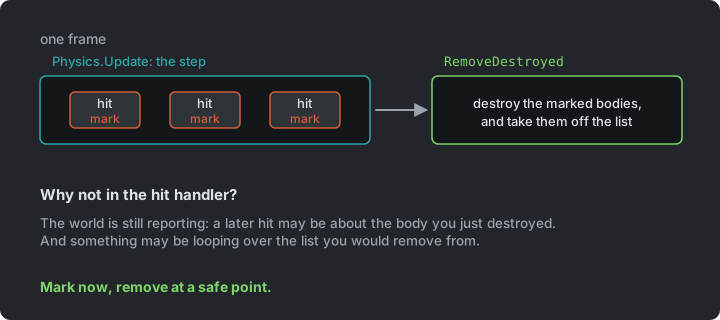
- The physics world is still reporting. More hits from the same step may follow, and one may be about the body you just destroyed. In many physics libraries (including older versions of Box2D), destroying a body during a callback crashes the game.
- You may be in the middle of a loop. Removing an entity from a list while something is looping over that list throws an exception, or skips an item. This is the re-entrancy pitfall from Zelda.
The handler therefore only marks entities as destroyed, and they’re removed later, when the step and all its hits are done:
_physics.Update((float)gameTime.ElapsedGameTime.TotalSeconds);RemoveDestroyed();
private void RemoveDestroyed(){    for (int i = _entities.Count - 1; i >= 0; i--)    {        Entity entity = _entities[i];        if (!entity.IsDestroyed)            continue;
        _score += entity.Points;        _physics.Destroy(entity.Body);        _entities.RemoveAt(i);    }}
The loop runs backwards, so removing an item doesn’t skip the next one. This pattern (mark now, remove at a safe point) comes back whenever objects are destroyed while the game is busy with them.
Prototype
Section titled “Prototype”Step Birds3
So far, the level is built in code, with every block’s material, size, health, points and sprite repeated:
_entities.Add(new Block(_physics, new Vector2(880, 590), new Vector2(20, 100), 0, Materials.Wood, 8, 500, _atlas.GetRegion("wood-post")));A level designer thinks in kinds of things, like a wood post, a glass box or a big pig. And they shouldn’t need to write C# to build a level.
The Prototype pattern: specify the kinds of objects to create using a prototypical instance, and create new objects by copying this prototype. (Design Patterns, Gamma et al.)
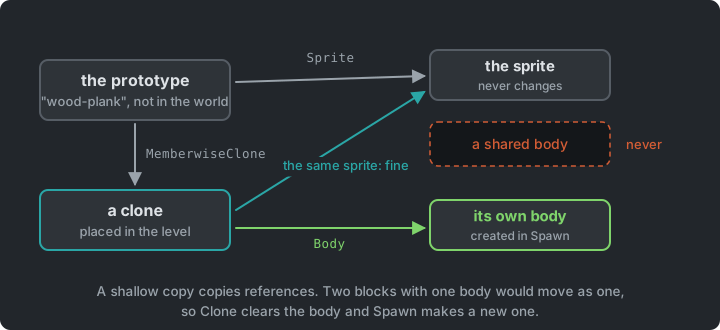
A prototype is a fully configured entity that isn’t in the world. To place one, copy it, and give the copy a body:
public Entity Clone(){    var copy = (Entity)MemberwiseClone();    copy.Body = null;    return copy;}
public void Spawn(PhysicsWorld world, Vector2 position, float rotation) => Body = CreateBody(world, position, rotation);
Prefabs keeps one prototype per kind of thing, by name:
foreach (var (name, material, health) in new[] { ("wood", Materials.Wood, 8f), ("stone", Materials.Stone, 16f), ("glass", Materials.Glass, 4f) }){    Add($"{name}-plank", new Block(material, plank, health, 500, atlas.GetRegion($"{name}-plank")));    Add($"{name}-post", new Block(material, post, health, 500, atlas.GetRegion($"{name}-post")));    Add($"{name}-box", new Block(material, box, health, 500, atlas.GetRegion($"{name}-box")));}
Add("pig", new Pig(22, 3, 5000, atlas.GetRegion("pig")));Add("big-pig", new Pig(30, 6, 5000, atlas.GetRegion("big-pig")));
public Entity Spawn(string name, PhysicsWorld world, Vector2 position, float rotation = 0){    Entity entity = _prototypes[name].Clone();    entity.Spawn(world, position, rotation);    return entity;}
And a level is a text file of prefab names and positions, like Sokoban’s levels:
wood-post 880 590 0wood-post 1040 590 0wood-plank 960 530 0pig 960 618 0glass-box 960 495 0pig 960 448 0A few details of how this works:
MemberwiseClonemakes a shallow copy. Every field is copied, but a field that refers to an object only copies the reference, so both point to the same object. The copy shares the prototype’s sprite, which is fine, because nobody changes a sprite. It must never share a body, because two blocks with one body would move as one.Cloneclears the body, andSpawncreates a new one.- Prototypes are instances. A “big pig” is a
Pigconfigured with a bigger radius and more health. A new kind of block is one line inPrefabs. - Anything can be a prototype. You could clone a block that’s already damaged, or a pig with a helmet you configured in code. The copy starts out the same as the original.
- The bird is a prefab too. When you shoot, the game spawns
"bird". A different kind of bird would be another prototype.
Prototype and Type Object (in Plants vs. Zombies) solve a similar problem: how to have many kinds of things without a class for each. Prototype copies a configured object; Type Object shares one object that describes a kind. We’ll compare them there.
Try it (Birds3): put a big-pig on top of the hut in level1.txt, and a
glass-box next to it. How much code did it take?
Aiming & Game States
Section titled “Aiming & Game States”Step Birds4
Birds4 adds three levels, a few birds per level (birds 3 at the top of a level file),
a curve that shows where the bird will fly while you aim, and game states like
Pac-Man’s:
stateDiagram-v2
    [*] --> Aim
    Aim --> Fly : shoot
    Fly --> Aim : settled, birds left
    Fly --> LevelEnd : settled, no pigs or no birds
    LevelEnd --> Aim : Enter
FlyState waits until the physics world has settled, with every body asleep.
The facade answers that question in one line (IsSettled), using Box2D’s count of awake
bodies.
The aiming curve doesn’t use the physics world at all. The bird flies in a parabola until
it hits something, so its position at time t is start + velocity * t + gravity * t² / 2.
The Whole Game
Section titled “The Whole Game”Step Birds4
Birds4 is the finished game. Game1 holds the physics world, the prefabs and the
entities, and its states decide when the player may aim.
classDiagram
    Core <|-- Game1
    Game1 --> StateMachine : game states
    Game1 --> PhysicsWorld
    Game1 --> Prefabs
    Game1 --> Slingshot
    Game1 --> Entity : many
    Entity <|-- Block
    Entity <|-- Pig
    Entity <|-- Bird
    Entity --> PhysicsBody
    Prefabs ..> Entity : clones
    Level ..> Prefabs : spawns from
    PhysicsWorld ..> Box2D
    PhysicsBody ..> Box2D
Box2D is reached from the Physics folder only.
Summary
Section titled “Summary”| Concern | Answer |
|---|---|
| A library that doesn’t fit our code | Adapter (PhysicsBody) |
| A big library, of which we need little | Facade (PhysicsWorld) |
| Metres and pixels | One class converts (Units) |
| Who owns a position | The physics world |
| What hit what | The library’s hit events, passed on as a C# event |
| Removing things while the game is busy with them | Mark now, remove after the step |
| Many kinds of blocks and pigs | Prototype |
Exercises
Section titled “Exercises”Start from Birds4.
- A new level: design
level4.txtfrom the prefabs (raiseLevelCountinGame1to play it). Add a new prefab too, e.g. a long stone plank. How much code did you change? - A new bird: add a heavy bird, twice the size of the normal one, as a prefab called
heavynext tobirdinPrefabs. Then let each level choose its birds. A level file starts withbirds 3, which gives the player three shots, all with the same bird. Change that line to a list of prefab names, one per shot, such asbirds bird bird heavy. The player shoots them in that order. Which part of this was data, and which needed code? - Explosive: a crate that, when destroyed, pushes everything nearby away. What does
the facade need to offer (e.g.
ApplyImpulse)? Add it without letting Box2D types out. An explosive crate is drawn insprites.png(50 × 50 at x = 120, y = 204), ready for a region. - Unit test the conversion:
Unitsis small, but easy to get wrong. Add aBirds.Testsproject, set up likeSokoban.Testsin Sokoban, and write tests that convert a point to metres and back, and check that y flips.Unitsisinternal(only the physics code should use it), so the test project can’t see it untilBirds4.csprojsays<InternalsVisibleTo Include="Birds.Tests" />in anItemGroup. - Swap the library (stretch): which files would change if you replaced Box2D with another physics library? Try it with Aether.Physics2D.
Apply It to Your Project
Section titled “Apply It to Your Project”- Which libraries does your game use (besides MonoGame)? Would the rest of your code notice if you replaced one?
- Does anything in your game exist twice (e.g. a position in two places)? Which copy owns it?
- Do you ever remove objects while looping over them, or while something is reporting about them?
- Which kinds of things in your game could be prototypes, and which could come from data files?
Check Yourself
Section titled “Check Yourself”What is the difference between an Adapter and a Facade?
An Adapter converts one interface into another that its users expect (here, a Box2D body
into a body in pixels). A Facade puts one simple interface in front of a whole subsystem
(here, a few methods in front of Box2D’s many). PhysicsWorld and PhysicsBody together
do both.
Why convert between metres and pixels at all?
Box2D is tuned for objects of about 0.1 to 10 metres. In pixels, objects would be tens or hundreds of units big, and would behave like huge, slow objects. The game simulates in metres, and draws in pixels.
Why not destroy a body inside the hit handler?
The physics world is still reporting hits, and a later one may be about the destroyed body; some libraries crash if the world changes during a callback. The game may also be looping over the list you remove from. Mark it, and remove it after the step.
What does a shallow copy share with the original, and why does that matter here?
For every field that refers to an object, the copy points to the same object. Sharing an unchanging sprite is fine, but sharing a physics body would make two entities one. So the clone gets its own body.
A block exists as an entity and as a physics body. Who owns its position?
The physics world. The entity has no position of its own, and reads its body’s position when it is drawn, because two copies would drift apart. The body knows its owner, so a hit reported about a body leads back to the entity.