
 0/14
0/14 0/12
0/1212 Vampire Survivors
Today’s Goal

Section titled “Today’s Goal”Make an auto-shooting game, like Vampire Survivors: walk around while your weapons fire by themselves, and survive five minutes against an ever-growing swarm.
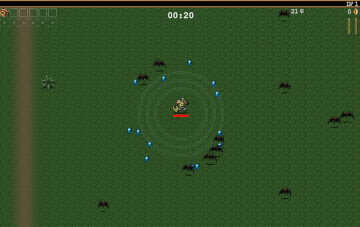
The swarm is what makes this game hard. Geometry Wars had hundreds of enemies and bullets (its thousands of particles were handled separately, by one system). Here we want thousands of enemies, and the code we’ve written so far can’t keep up. This session is about performance, and about doing the work in the right order.
- Profiling. Measure where the time goes, before changing anything.
- Spatial partitioning. Stop comparing every enemy with every other enemy.
- Data-oriented design. Lay out the data for the loops that use it.
Source code: gar-games/12-vampire-survivors
Prepare
Section titled “Prepare”- Data Locality
- Spatial Partition
- Data-Oriented Design (video; watch the first half)
Enemies as Objects
Section titled “Enemies as Objects”Step Survivors0
Survivors0 is written the way we’ve written games so far. Each enemy is an object in a
List<Enemy>. Enemies walk towards the player, and they push each other apart so that they
crowd around you instead of piling into one spot:
// Every enemy is checked against every other: for n enemies, n × n / 2 checks.public void Separate(){ for (int i = 0; i < _enemies.Count; i++) { for (int j = i + 1; j < _enemies.Count; j++) Push(_enemies[i], _enemies[j]); }}The weapons ask the swarm questions too. Which enemy is nearest? Which enemies are inside the aura? Each question looks at every enemy.
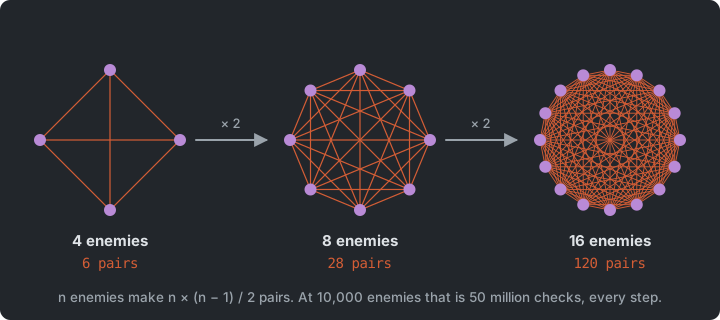
It plays fine at first. Press Space a few times to add a thousand enemies each time, and the game slows to a crawl. Before changing anything, we find out why, because guessing is how you end up optimizing the wrong thing.
Try it (on paper): with 2,000 enemies, how many pairs does Separate check each step? And with
10,000?
Profiling
Section titled “Profiling”Step Survivors1
Profiling is measuring where a program spends its time and memory. Survivors1 adds a
small profiler that times each part of a logic step (F3 shows it):
using (_profiler.Measure("Move"))    _swarm.Move(deltaSeconds, _player.Position);
using (_profiler.Measure("Separate"))    _swarm.Separate();
Measure starts a Stopwatch timestamp, and returns a small struct whose Dispose (at the
end of the using) adds the time to that section. Every second, the profiler shows each
section’s average in milliseconds per frame, the frames per second, how many bytes the game
allocated per frame, and how often the garbage collector ran.
With a thousand enemies, the answer is clear: Separate takes almost all of the time.
Moving, the weapons and drawing are tiny in comparison. At 60 frames per second a frame has
16.7 ms, and checking every pair uses that up quickly:
| Enemies | Pairs to check | Move + separate (ms per step) |
|---|---|---|
| 1,000 | 0.5 million | 1.2 |
| 2,000 | 2 million | 4.5 |
| 5,000 | 12.5 million | 27 |
| 10,000 | 50 million | 107 |
Twice the enemies means four times the work. The cost grows with the square of the number of enemies, O(n²). No amount of tuning the inside of the loop fixes that.
(These numbers, and the ones below, are from one laptop, with a Release build. Yours will
differ, but they should grow the same way. Measure with dotnet run -c Release: a Debug build is slower,
and slower in different places.)
The profiler also shows allocations. Survivors0 allocates a little every frame,
because Nearest and Within use LINQ (Where, OrderBy, ToList), which creates new
objects each call. Allocations cost time now and garbage collections later, which show up as
stutters. The same profiling works on your own game, and bigger tools exist too (the
Performance Profiler in Visual Studio, dotnet-counters and dotnet-trace).
Try it (Survivors1, in Release): press F3, then Space until a frame takes more than
16.7 ms. How many enemies is that, and which section takes the time?
Spatial Partitioning
Section titled “Spatial Partitioning”Step Survivors2
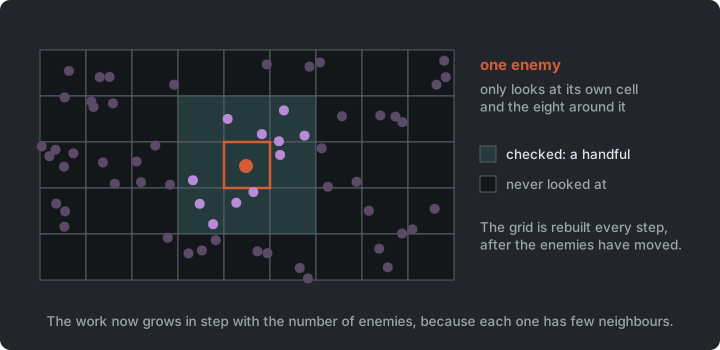
An enemy can only overlap enemies that are close to it, so there is no need to look at the others. Spatial partitioning organizes objects by where they are, so that finding the ones near a point only looks near that point.
The simplest version is a uniform grid. Cut the world into square cells, and keep a list of the enemies in each cell. It’s rebuilt after the enemies move, every step.
public void Add(int item, Vector2 position){    Point cell = CellOf(position);    if (!_cells.TryGetValue(cell, out var items))    {        items = [];        _cells[cell] = items;    }    items.Add((item, position));}
// Fills results with every item within radius of center.public void Query(Vector2 center, float radius, List<int> results){    results.Clear();    Point min = CellOf(center - new Vector2(radius));    Point max = CellOf(center + new Vector2(radius));    for (int y = min.Y; y <= max.Y; y++)        for (int x = min.X; x <= max.X; x++)            // ... check the items in cell (x, y)}
Now each enemy only checks the few enemies in the cells around it, and so do the weapons’ questions. The work now grows in step with the number of enemies:
| Enemies | Every pair | Grid |
|---|---|---|
| 1,000 | 1.2 ms | 1.3 ms |
| 5,000 | 27 ms | 1.9 ms |
| 10,000 | 107 ms | 4.1 ms |
| 20,000 | — | 14.5 ms |
Notice the first row. With a thousand enemies, the grid is no faster. Building it costs something, and for small numbers checking every pair is cheap. Spatial partitioning pays off when there are many objects, and it’s more code to get right.
Grids aren’t the only way. Other structures (quadtrees, BVHs, sweep and prune) adapt better to objects of very different sizes, or to worlds where most of the space is empty. For many objects of about the same size, spread over a limited area, a grid is hard to beat, and it’s the simplest.
The grid fills the same lists every call (_found, _nearby) instead of new ones, so
Survivors2 no longer allocates new lists for every question the weapons ask.
Testing the grid
Section titled “Testing the grid”An optimization has to give the same answers as the slow, obvious code it replaces. That’s easy to test. Put thousands of random points in the grid, and compare every query with checking every point (Sokoban introduced unit tests):
[Theory][InlineData(10f)][InlineData(48f)][InlineData(150f)][InlineData(500f)]public void The_grid_finds_the_same_points_as_checking_every_point(float radius){ Vector2[] points = RandomPoints(2000, seed: 1); FlatGrid grid = GridWith(points); // ... for 100 random centres: grid.Query(center, radius, results); Assert.Equal(CheckEveryPoint(points, center, radius), results.OrderBy(i => i));}A [Theory] runs once for each [InlineData]: radii smaller than a cell, about one cell,
and many cells. Points on cell borders, at negative coordinates and far outside the grid
have tests of their own; those are where grids go wrong. The tests run on the finished
game, so the grid they check is FlatGrid, which the next section builds. It answers the
same questions as SpatialGrid.
Try it (Survivors2, in Release): go to 10,000 enemies and compare Separate with
Survivors1. Then run dotnet test in the folder.
Data-Oriented Design
Section titled “Data-Oriented Design”Step Survivors3
The grid fixed the algorithm. The next step is the data, how it’s laid out in memory and how the loops read it.
Why memory layout matters
Section titled “Why memory layout matters”A CPU is much faster than its memory. To hide that, it reads memory in blocks (cache lines, usually 64 bytes) and keeps recently used blocks close by, in its cache. Reading data that’s next to data you just read is almost free. Reading data somewhere else in memory means waiting for it, which is called a cache miss.
A List<Enemy> is a list of references. Each Enemy object lives somewhere on the heap,
with its own header, and each enemy’s Kind is another object somewhere else. A loop over
the positions jumps around memory, following references. That’s the problem
Data Locality describes.
Data-oriented design starts from the data and what the loops do with it. Most loops here
touch one or two fields of every enemy. Move reads positions and speeds, and Separate
reads positions and radii. So we put each field in its own array, making a struct of
arrays instead of an array of objects.
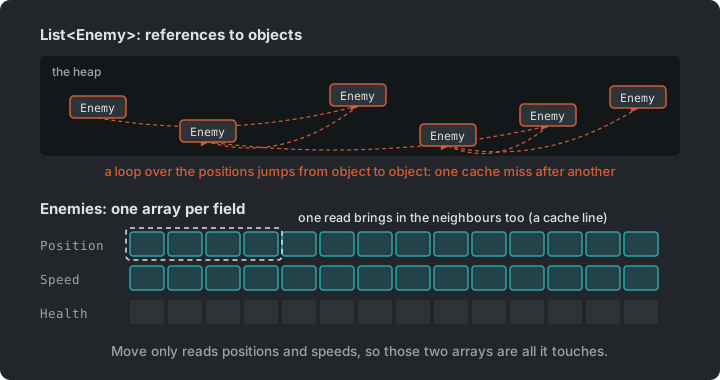
// There's no Enemy object: an enemy is an index, and each of its fields is in its own// array, packed from 0 to Count - 1.public sealed class Enemies(int capacity){    public readonly Vector2[] Position = new Vector2[capacity];    public readonly float[] Health = new float[capacity];    public readonly float[] Speed = new float[capacity];    public readonly float[] Radius = new float[capacity];    public readonly byte[] Kind = new byte[capacity];
    // The last enemy moves into the hole: nothing shifts, and the arrays stay packed.    public void RemoveAt(int index) { ... }}
The speed and radius come from the enemy’s kind (Type Object, as in Plants vs. Zombies), but they’re copied into arrays, because the hot loops read them for every enemy, every step.
Measure again
Section titled “Measure again”We first converted only the enemies to arrays, and kept the grid. It made almost no difference. With 10,000 enemies, the time went from 4.1 ms to 3.9 ms. The time wasn’t in reading enemies; it was in the grid, which looks up cells in a dictionary and walks lists of tuples for every query. The data layout that matters is the data in the hot loop, and only measuring tells you which loop that is.
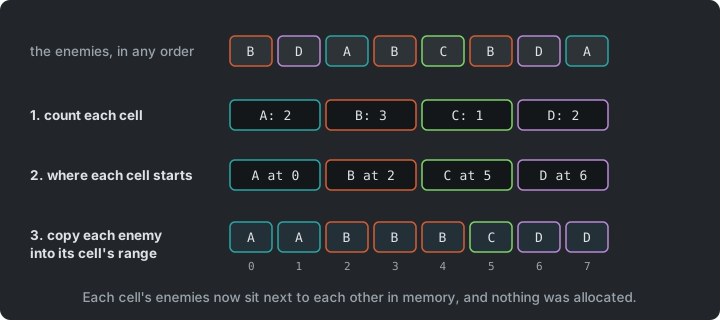
Survivors3 therefore makes the grid data-oriented too. FlatGrid covers a fixed area around the
player, and is rebuilt every step with a counting sort into plain arrays:
// 1. Count the items in each cell.for (int i = 0; i < count; i++){    int cell = CellIndex(positions[i]);    _cellOf[i] = cell;    _cellStart[cell + 1]++;}
// 2. Each cell starts where the one before it ends.for (int c = 0; c < columns * rows; c++)    _cellStart[c + 1] += _cellStart[c];
// 3. Copy each item into the next free place in its cell.for (int i = 0; i < count; i++){    int slot = _next[_cellOf[i]]++;    Items[slot] = i;    Positions[slot] = positions[i];}
Now the enemies in a cell are next to each other in memory, positions included. Separate
doesn’t query at all. It walks the cells, and checks each enemy against the rest of its
cell and the neighbouring cells, reading positions from one array, in order. Nothing is
allocated, and there’s no dictionary.
| Enemies | Every pair | Grid | Arrays + flat grid |
|---|---|---|---|
| 1,000 | 1.2 ms | 1.3 ms | 0.24 ms |
| 5,000 | 27 ms | 1.9 ms | 0.64 ms |
| 10,000 | 107 ms | 4.1 ms | 1.3 ms |
| 20,000 | — | 14.5 ms | 4.9 ms |
At 10,000 enemies, that is about three times faster than the object grid, and about 80 times faster than where we started.
What it costs
Section titled “What it costs”- An enemy is an index. There’s no object to pass around, and an index changes when another enemy is removed (the last one moves into the hole). Holding on to an index across frames leads to bugs that are hard to find.
- Harder to read.
positions[i] += ... * speeds[i]says less thanenemy.Position += ... * enemy.Kind.Speed. - Harder to change. A new enemy field means a new array, and every place that copies or removes enemies must handle it.
For this reason only the swarm (and the gems, of which there are thousands too) is written this way. The player, the weapons and the bolts are still ordinary objects, since there are few of them, and they aren’t where the time goes.
Compare Geometry Wars: entities made of component objects, each updated through its own methods. That’s flexible and readable, and fine for hundreds of entities. For tens of thousands of the same kind of thing, the particles there and the swarm here are handled as data, by one system, in bulk. Many engines mix the two in the same way.
Try it (Survivors3, in Release): at 10,000 and 20,000 enemies, compare the profiler
with Survivors2. Which sections changed the most?
Making It a Game
Section titled “Making It a Game”Step Survivors4
Survivors4 makes it a game, reusing much of the course along the way:
- Enemies drop gems, also stored as arrays. Gems near the player fly to them.
- Enough experience and you level up. A
LevelUpStateis pushed on the state stack (Pokemon), on top of the paused game, with three upgrades to choose from. - The enemy kinds are type objects, and the logic runs at a fixed timestep
(GARCore’s
Core, from Geometry Wars). - Survive five minutes to win. The profiler is still there (F3).
When to Optimize
Section titled “When to Optimize”Programmers waste enormous amounts of time thinking about, or worrying about, the speed of noncritical parts of their programs […]. We should forget about small efficiencies, say about 97% of the time: premature optimization is the root of all evil. Yet we should not pass up our opportunities in that critical 3%. (Donald Knuth)
The order of this session is the order to work in:
- Measure. Find the part that’s slow. It’s rarely where you’d guess.
- Fix the algorithm. O(n²) to O(n) beats any amount of tuning.
- Fix the data, where it’s hot. Lay it out for the loop that reads it.
- Measure again, to see if it helped. Sometimes it doesn’t, and that’s worth knowing.
- Keep a test that checks the fast code against the simple code.
The Whole Game
Section titled “The Whole Game”Step Survivors4
Survivors4 is the finished game. A Run holds one game, and the states on the state
stack decide when it runs.
classDiagram
    Core <|-- Game1
    Game1 --> StateStack
    Game1 --> Run : current
    StateStack --> PlayState
    StateStack --> LevelUpState
    PlayState ..> Run : updates
    Run --> Player
    Run --> Swarm
    Run --> Gems
    Run --> BoltWeapon
    Run --> Aura
    Swarm --> Enemies
    Swarm --> FlatGrid
    Enemies ..> EnemyKind : kind index
    BoltWeapon ..> Swarm : asks
    Aura ..> Swarm : asks
    LevelUpState ..> Run : upgrades
Only the swarm and the gems are stored as arrays. The player, the weapons and the bolts are ordinary objects.
Summary
Section titled “Summary”| Concern | Answer |
|---|---|
| Where the time goes | Profiling |
| Finding what is near | Spatial partitioning, with a uniform grid |
| Fast loops over thousands of things | A struct of arrays (data-oriented design) |
| Whether the fast code is still right | A test against the slow, obvious code |
| When to optimize | After measuring. The algorithm first, then the data |
Exercises
Section titled “Exercises”Start from Survivors4 (or Survivors3 for the measuring exercises), in Release.
- Tune the grid: try cells half as big and twice as big (in
Swarm). Measure. What happens to the time, and why? Why can’t the cells be smaller than the biggest overlap? - Bolts as arrays? Convert the bolts to arrays. Measure: was it worth it? When would it be?
- Find the next bottleneck: with 20,000 enemies (in
Survivors3, pressSpacetwenty times), what does the profiler say now? Try to make it faster, and keep the tests green. - A new enemy kind: a fast, weak one that appears in groups. What changes in
EnemyKind,Enemiesand the spawner? A rat is drawn insprites.png(48 × 48 at x = 0, y = 62), ready for a region. - Several cores (stretch): separation could run on several cores (
Parallel.Forover rows of cells). What goes wrong when two threads push the same enemy? How could you avoid it?
Apply It to Your Project
Section titled “Apply It to Your Project”- Profile your game with many more entities than normal. Where does the time go?
- Is there anything in your game that checks every pair, or searches every entity?
- Does your game allocate every frame? Where (LINQ, new lists, closures, strings)?
- Is there anything there are thousands of? Would it be worth storing as data?
Check Yourself
Section titled “Check Yourself”Why profile before optimizing?
Because the slow part is rarely where you expect it. You might guess that drawing thousands of sprites is the problem, but separation was almost all of the time. And after converting the enemies to arrays, only measuring showed that the time was in the grid.
How does a uniform grid make separation cheaper?
Each enemy is only compared with the enemies in its own and neighbouring cells. The work then grows in step with the number of enemies.
What is the difference between an array of objects and a struct of arrays, and why does it matter?
An array of objects holds references to objects spread over the heap; reading a field of each means jumping around memory. A struct of arrays keeps each field in its own contiguous array, so a loop over one field reads memory in order, which the CPU’s cache makes fast.
What do you give up with data-oriented design?
Readable objects and stable references. An entity is an index that can change, fields are spread over arrays, and adding a field touches more code. It’s worth it where there are very many things and the loops over them are hot.
With 1,000 enemies, the grid was no faster than checking every pair. Why?
Building the grid every step costs something, and for a small number of enemies checking every pair is cheap. Spatial partitioning pays off when there are many objects.
Related exam questions: 7, 10.
Course Recap
Section titled “Course Recap”The course recap brings together the patterns from all twelve games, the threads that run through them (input, data, entities, testing, performance), and the exam questions they prepare you for. Go through it with your project open, and for each thread, find where it shows up in your own game.