
 0/14
0/14 0/12
0/1206 Super Mario Bros
Today’s Goal

Section titled “Today’s Goal”Make a platform game, like Super Mario Bros: run and jump through a level that scrolls sideways, collect coins, and stomp on the creatures in your way.
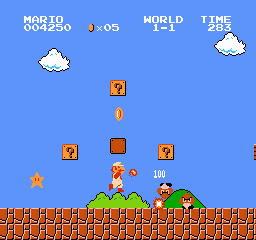
This session’s topic is the game world. The level is a tilemap, the player and the creatures are entities that move through it, and a camera shows the part of the level you can see.
To get the player around the world, we need platformer physics and collision with tiles. The levels come from level makers, which is the Strategy pattern again. We add debug drawing to see the collision boxes. The player gets states, as the ghosts did in Pac-Man, but these share their physics and react to the world.
Source code: gar-games/06-super-mario-bros
Prepare
Section titled “Prepare”- State, the rest of the chapter. You read the first half for Pac-Man; “Hierarchical State Machines” is close to what the player’s states do here.
- Optional: The guide to implementing 2D platformers (Rodrigo Monteiro), on how tile-based platformers handle collision, slopes and moving platforms
Levels From Code
Section titled “Levels From Code”Step Mario0
In Snake, the tilemap was loaded from an XML file. Levels can also be generated in code:
private void GenerateLevel(){    Tileset tileset = _tilesets[Random.Shared.Next(_tilesets.Count)];    _tilemap = new Tilemap(tileset, Columns, Rows);
    for (int x = 0; x < Columns; x++)    {        for (int y = Rows - GroundHeight; y < Rows; y++)        {            // A tile is more than a graphic: it also knows whether it is solid.            _tilemap.SetTile(x, y, new Tile(GroundTile, isSolid: true));        }    }}
The tilemap now stores Tile values instead of plain integer ids. A tile knows more than
its graphic:
// One cell of a tilemap: which tileset graphic to draw, and whether it blocks movement.public readonly struct Tile(int graphicId = -1, bool isSolid = false){    public static readonly Tile Empty = new();
    public int GraphicId { get; init; } = graphicId;    public bool IsSolid { get; init; } = isSolid;    public bool IsEmpty => GraphicId < 0;}
Tile and Tilemap live in GARCore, so they only hold what any tile-based game needs.
Because the graphics are separate from the level’s structure, the same level can be drawn
with any of the four tilesets in tiles.png (press R).
Try it (Mario0): in GenerateLevel, leave a gap two tiles wide in the ground, and
raise the ground by two tiles in the middle. Press R: what changes, and what doesn’t?
Strategy pattern: level makers
Section titled “Strategy pattern: level makers”Step Mario1
Different kinds of levels are produced by interchangeable level makers sharing one
base: SimpleLevelMaker, FlatLevelMaker, PillarLevelMaker, PitLevelMaker,
ComplexLevelMaker (keys 1–5 in this step). The game asks a level maker for a level
without knowing which algorithm it uses. This is the Strategy pattern from
Pac-Man: a family of interchangeable algorithms behind a common interface.
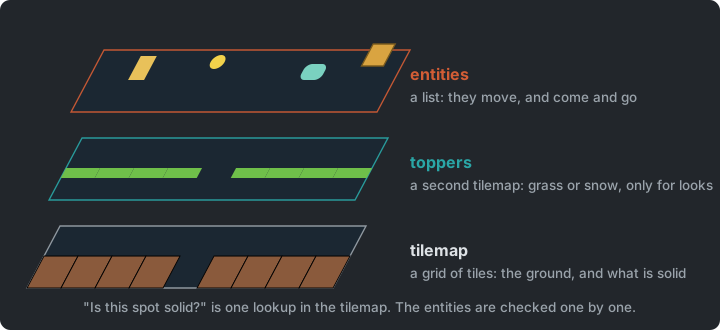
The grass or snow on top of the ground (the toppers) is a detail of this game, so it
isn’t part of Tile. Instead, a GameLevel has two tilemaps
of the same size: Tilemap for the ground and Toppers, drawn on top with its own
tileset. Layering tilemaps like this is how most tile editors (e.g. Tiled) work, and
Pokemon uses it for its tall grass.
Each level also gets a random background.
Try it (Mario1): make pits twice as common in PitLevelMaker, then press 4 to
see it.
Platformer Physics
Section titled “Platformer Physics”Step Mario2
- Gravity and jumping: gravity adds to the vertical velocity every frame; a jump sets it to a negative impulse.
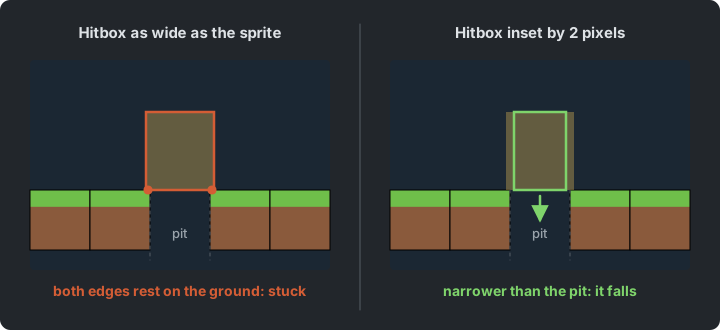
- Hitbox inset: the player is a little wider than a tile, which makes pits impossible to fall into. We shrink the hitbox by 2 px on each side.
- Ground check: probe one pixel below the hitbox for solid tiles.
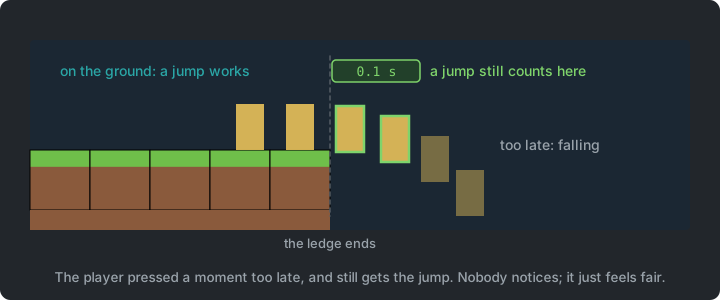
- Coyote time: allow a jump for a moment after walking off a ledge. It feels fairer.
Tile collision
Section titled “Tile collision”The player moves first and is corrected afterwards. After a move, the hitbox may overlap a solid tile. Then the player is snapped back to that tile’s edge, and the velocity on that axis is set to zero:
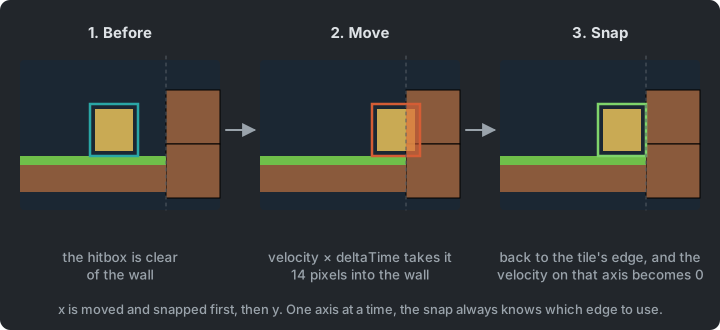
Only the tiles at the hitbox’s leading edge are checked, which is two lookups in the tilemap. The two axes are done one after the other:
// Resolve X (Move then Snap)Player.Position = new Vector2(Player.Position.X + Player.Velocity.X * dt, Player.Position.Y);ResolveXCollisions();
// Resolve Y (Move then Snap)Player.Position = new Vector2(Player.Position.X, Player.Position.Y + Player.Velocity.Y * dt);ResolveYCollisions();
Moving both axes at once would leave a question with no good answer. A hitbox that ends up inside a corner could have come from the side or from above. With one axis at a time, the snap always knows which way the player was moving, so it knows which edge to snap to.
Try it (on paper): with 18-pixel tiles, a hitbox spans x 34 to 50 and moves 8 pixels right, and a wall starts at x 54. Where is the hitbox after the move, and after the snap? What happens to its velocity?
Try it (Mario2): press F1, and set HitboxInset to 0. Can you still fall into a
one-tile pit? Then set CoyoteTime to 0.5: how does jumping off a ledge feel?
Performance
Section titled “Performance”The player doesn’t need to be tested against every tile. The grid is static, so we can
look up the tile at a position directly (IsSolidAt(x, y)). That costs the same for a level of
10 or 10,000 tiles: O(1) instead of O(n). Moving entities can’t be looked up this
way. Testing all pairs of entities is O(n²); in
Vampire Survivors we make that fast too.
Debug drawing
Section titled “Debug drawing”Collision bugs are hard to see. The hitbox is invisible, and a player that stops a few
pixels early looks just like one that works. Debug drawing makes them visible. Press
F1 to outline the solid tiles in red and the player’s hitbox in green (from Mario6,
the entities in yellow too). You can see the hitbox inset, and where the player
collides.
GARCore gets a small DebugDraw class. Its drawing calls do nothing unless
DebugDraw.Enabled is true, so they can stay in the code:
if (Tilemap.GetTile(column, row).IsSolid){ Vector2 position = Tilemap.TileToPoint(column, row); DebugDraw.Rectangle(spriteBatch, new Rectangle((int)position.X, (int)position.Y, (int)Tilemap.TileWidth, (int)Tilemap.TileHeight), Color.Red);}Debug drawing and the debugger complement each other. The debugger shows the exact values at one moment (set a breakpoint in the collision code and inspect the hitbox); debug drawing shows what happens over time, while the game runs.
Input: GameController
Section titled “Input: GameController”As in Snake, the platformer maps keys to actions through a GameController
class (GameController.Jump instead of Keys.Space).
Discuss: this is not the Command pattern from Sokoban. Why not?
Player States
Section titled “Player States”Steps Mario2 → Mario3
In Mario2, the player’s state is an enum, and its behaviour lives in switch statements,
like Pac-Man’s ghosts before the State pattern. Mario3
makes the same move. Each case becomes a class (PlayerIdleState, PlayerWalkState,
PlayerJumpState, PlayerFallState, PlayerDuckState), and Player forwards Update and
Draw to its current state. Two things are new compared with the ghosts:
- Shared behaviour in a base state. Every player state falls, collides with tiles and
moves sideways. That physics is written once, in
PlayerStateBase, and each state adds only what is different. The jump state sets the upward velocity, and the duck state ignores sideways input. The ghosts’ states shared almost nothing. - The world triggers transitions too. A ghost changes mode on a timer or when Pac-Man eats a pellet. The player also changes state because of the level: walking off a ledge starts a fall, a jump turns into a fall at the top of its arc, and landing ends a fall. Coyote time is a transition too. For a few frames after leaving the ground, the fall state still lets a jump through.
stateDiagram-v2
    [*] --> Idle
    Idle --> Walking : move input
    Walking --> Idle : no input
    Idle --> Ducking : down
    Walking --> Ducking : down
    Ducking --> Idle : release down
    Idle --> Jumping : jump
    Walking --> Jumping : jump
    Jumping --> Falling : velocity.y > 0
    Idle --> Falling : no ground
    Walking --> Falling : no ground
    Falling --> Idle : landed
    Falling --> Walking : landed, moving
    Falling --> Jumping : jump during coyote time
Try it (Mario3): make the player jump higher and walk faster. Which class holds
each value?
Camera
Section titled “Camera”Step Mario4
Our previous games fit on one screen. A level wider than the screen needs a camera: a transform that shifts the world so the target (the player) is centred:
Transform = Matrix.CreateTranslation(new Vector3(-Position, 0)) * // Shifts the world based on target position Matrix.CreateTranslation(new Vector3(center, 0)); // Centers the target in the viewportspriteBatch.Begin(transformMatrix: Camera.Transform * screenScale, samplerState: SamplerState.PointClamp);There are now two coordinate spaces. The player, the tiles and the entities keep their
positions in the world, and nothing in the game’s logic knows where the camera is. Only
drawing goes through the camera, which turns world positions into screen positions. The
score is drawn in a second Begin, without the camera, so it stays where it is.
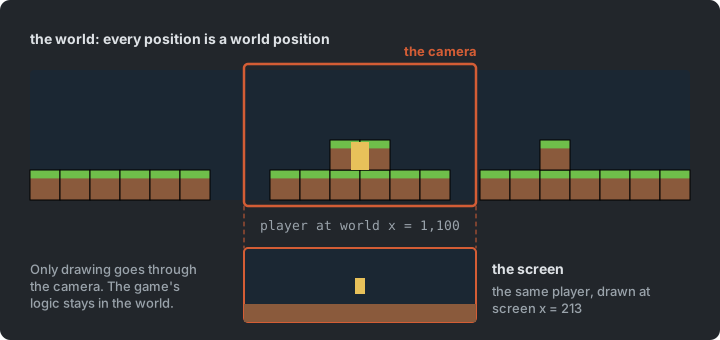
Here we only follow the x-axis, and clamp the camera to the level’s edges. The background scrolls at half the camera’s speed, for a parallax effect.
Try it (Mario4): make the background scroll at a quarter of the camera’s speed
(in GameLevel). What do the factors 0 and 1 look like?
Game States
Section titled “Game States”Step Mario5
The game itself has states too, as in Flappy Bird. A StartState shows the title screen,
and a PlayState creates the level and the player. Falling into a pit
sends you back to the title screen.
Entities
Section titled “Entities”Step Mario6
An entity is any “thing” in the game that isn’t part of the tilemap: the player, slimes, bushes, mystery boxes (the “?” blocks), coins. Entities don’t align to the grid, they move, and they can have their own states.
public interface IEntity{    Vector2 Position { get; set; }    Rectangle Bounds { get; }    bool Collidable { get; set; }    bool IsSolid { get; }    bool Active { get; set; }
    void Update(GameTime gameTime);    void Draw(SpriteBatch spriteBatch);    bool Collides(IEntity other);}
The level updates all entities through the Update Method pattern, and each entity decides how to respond to collisions. Solid entities (mystery boxes) block the player just like tiles. Hitting a box from below pops out a coin, and collecting coins raises the score.
The world now has two parts, and each suits what it holds. The tilemap is a grid that never changes, so “is this spot solid?” is one lookup. Entities are few, they move, and they come and go, so they are a list that is checked one by one. A box that pops out a coin adds an entity while the level is looping over its entities. The level collects such additions and removals, and applies them after the loop.
Basic AI: Slime States
Section titled “Basic AI: Slime States”Step Mario7
Enemy AI can be built from states too:
- Base: shared collision resolution, gravity, ground detection
- Idle: plays an idle animation for a while
- Walk: walks, turns around at edges or when blocked
- Chase: moves towards the player when close
Landing on a slime from above stomps it. Touching it any other way ends the game.
The Whole Game
Section titled “The Whole Game”Step Mario8
Mario8 adds music and sound effects, and is the finished game. The play state asks a level
maker for a GameLevel, which holds the two tilemaps, the entities and the camera. The
player and each slime hold their current state.
classDiagram
    Core <|-- Game1
    Game1 --> GameStateBase : current
    GameStateBase <|-- StartState
    GameStateBase <|-- PlayState
    PlayState --> LevelMakerBase
    PlayState --> GameLevel
    LevelMakerBase ..> GameLevel : builds
    GameLevel --> Tilemap : ground and toppers
    GameLevel --> Camera
    GameLevel --> IEntity : many
    IEntity <|.. Player
    IEntity <|.. Slime
    IEntity <|.. Coin
    IEntity <|.. MysteryBox
    IEntity <|.. Bush
    Player --> PlayerStateBase : current
    Slime --> SlimeStateBase : current
There are three kinds of state in one game. The game has states, the player has states, and every slime has states, each kind with a base class of its own.
Summary
Section titled “Summary”| Concern | Answer |
|---|---|
| What the level is made of | Tilemaps of Tile values, built by level makers (Strategy) |
| Things that move | Entities, in a list |
| Whether a spot is solid | One lookup in the grid, O(1) |
| Stopping at a wall | Move, then snap, one axis at a time |
| What the player is doing | States that share their physics in a base state |
| A level wider than the screen | A camera transform |
| Seeing what the collision code does | Debug drawing |
Exercises
Section titled “Exercises”Start from Mario8.
- A chunk level maker: design a handful of short level chunks by hand (a pit with a
platform over it, a staircase, a slime on a ledge), each a small grid of tiles in a data
file in
Content/Assets. The builder copies.xmlfiles as they are; for another format, such as.txt, add anIncludeCopyrule inBuilder.cs. Write a level maker that strings random chunks together. Which chunks may follow which, so that every level can be finished? - Moving platforms: a platform that glides back and forth and carries the player standing on it. Where does “carried along” belong: in the platform, in the player, or in the collision code?
- Powerups: add a diamond (for a few seconds, slimes can’t hurt the player) and a
mushroom (the player grows).
Both are drawn in
images/extras.png. How do you add these without piling flags onto thePlayerclass? Is “big” a player state, like jumping? The player can be big and jumping at once, so what does that say about putting both in one state machine? - Debug drawing: also draw the probe below the player that checks for ground
(
IsOnGroundinPlayerStateBase), and show the player’s current state and velocity on screen. Use it to find where coyote time starts and ends. - Auto-tiling (stretch): each topper set in
tile_tops.pnghas a middle piece (tile 0), a left end (1), a right end (2) and a single piece (3), but the level makers always use the middle. Look at each topper’s neighbours and pick the matching piece, so the grass rounds off at every ledge. Where does that belong: in the level maker, or in the tilemap? - A scene graph (stretch): in the moving-platform exercise, the player rides along.
Engines solve this with a hierarchy of transforms. A child’s position is relative to its
parent’s, so while the player stands on the platform, it becomes the platform’s child.
Sketch a
Transformwith a parent. What does the player’s position in the world become when the platform moves? Game Programming Patterns uses the same example in Dirty Flag.
Apply It to Your Project
Section titled “Apply It to Your Project”- What would you want to see while debugging your game? Add debug drawing for your hitboxes, triggers or AI targets, behind a key.
- Which entities in your game have distinct behaviour modes? Draw a state diagram for one of them.
- Is anything in your game currently a set of booleans that should be a state machine?
Check Yourself
Section titled “Check Yourself”What do the player’s states share, and where does that code live?
Every state needs gravity, tile collision and moving sideways, so they live once in
PlayerStateBase. Each state overrides only what is different about it. Without the base
class, every state would carry its own copy of the physics, and a fix to one would miss
the others.
Why can tile collision be O(1) while entity collision can't?
Tiles never move and sit in a grid, so a position maps directly to a tile index. Entities move freely, so we have to check them against each other.
Why keep debug drawing in the code, behind a switch, instead of deleting it once a bug is fixed?
The next bug needs it too. Behind a switch it costs nothing when it is off, and anyone working on the game can turn it on to see what the collision code is doing.
Why does tile collision move and snap one axis at a time?
A hitbox that ends up inside a corner after moving on both axes could have come from the side or from above. With one axis at a time, the snap knows which way the player was moving, so it knows which edge to snap to.
Why are the level makers an example of the Strategy pattern?
Each one is a different algorithm for the same job, building a level, behind a common base. The game asks a level maker for a level without knowing which one it has, so a new kind of level is a new class.