
 0/16
0/16 0/12
0/1203 Snake
Today’s Goal

Section titled “Today’s Goal”Make a grow-and-avoid game, like Snake: eat to grow longer, and steer clear of the walls and your own tail.

This time we don’t start from scratch. You get a working codebase, and we look at how it keeps its assets as data. The images, the animations and the room are described in XML files, and the code reads them from there.
The session also covers texture atlases, sprites and animation, movement on a fixed tick, and input as actions, with input buffering.
Source code: gar-games/03-snake
Prepare
Section titled “Prepare”- 07: Optimizing Texture Rendering
- 08: The Sprite Class
- 09: The AnimatedSprite Class
- 13: Working With Tilemaps
- Optional: 11: Input Management and 12: Collision Detection, for the supporting topics
- Optional: 22: Snake Game Mechanics and 23: Completing the Game. The tutorial builds a snake game of its own, with grid movement on a fixed tick and input buffering.
Assets as Data
Section titled “Assets as Data”Snake uses the same content builder as Pong and Flappy Bird,
with all steps sharing one assets folder, Content/Assets. Next to the images, it contains
XML files that describe the assets. They say which part of the image is the snake, how
its animations run, and which tile goes where in the room. The builder copies those files as
they are, because our own code reads them:
// Images are built into textures. Magenta pixels become transparent (color keying).content.Include<WildcardRule>("*.png", new TextureImporter(), new TextureProcessor{    ColorKeyEnabled = true,    ColorKeyColor = Color.Magenta,    GenerateMipmaps = false,    PremultiplyAlpha = true,});
// The atlas and tilemap definitions are read by our own code at runtime,// so they are copied as they are instead of being built.content.IncludeCopy<WildcardRule>("*.xml");
The benefit is that the data can change while the code stays the same. A new animation frame, a new sprite or a different room is an edit to an XML file. An artist or designer can make it without touching the game’s code, and the code stays smaller and more general.
Texture Atlases
Section titled “Texture Atlases”Steps Snake0 → Snake1
Loading body.png, head1.png, food1.png… as separate textures means the GPU must
switch texture between draws, which breaks batching. A texture atlas (sprite sheet)
packs many images into one texture.
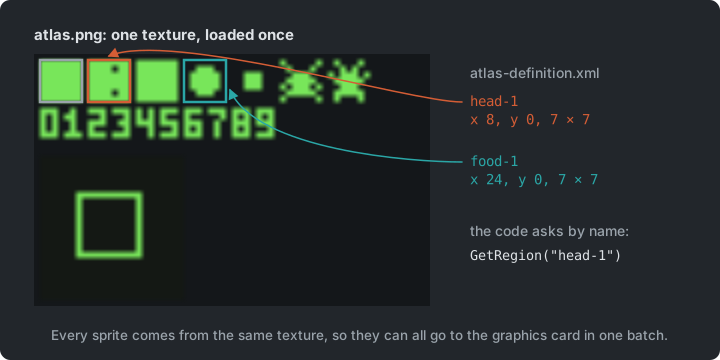
Snake0 draws parts of the atlas by passing hardcoded source rectangles to
SpriteBatch.Draw(), which gets hard to maintain as the number of sprites grows. In
Snake1, an XML atlas definition gives each rectangle a name, and a texture region is
a named rectangle within the atlas:
<TextureAtlas> <Texture>images/atlas</Texture> <Regions> <Region name="head-1" x="8" y="0" width="7" height="7" /> <Region name="food-1" x="24" y="0" width="7" height="7" /> </Regions></TextureAtlas>TextureAtlas atlas = TextureAtlas.FromFile(Content, "images/atlas-definition.xml");TextureRegion head = atlas.GetRegion("head-1");classDiagram
class TextureAtlas {
+Texture2D Texture
+FromFile(content, fileName)$ TextureAtlas
+GetRegion(name) TextureRegion
+CreateSprite(regionName) Sprite
+CreateAnimatedSprite(animationName) AnimatedSprite
}
class TextureRegion {
+Texture2D Texture
+Rectangle SourceRectangle
+Draw(spriteBatch, position, color)
}
class Sprite {
+TextureRegion Region
+Color Color
+float Rotation
+Vector2 Scale
+Vector2 Origin
+Draw(spriteBatch, position)
}
class AnimatedSprite {
+Animation Animation
+Update(gameTime)
}
class Animation {
+List~TextureRegion~ Frames
+TimeSpan Delay
}
TextureAtlas o-- TextureRegion
Sprite --> TextureRegion
Sprite <|-- AnimatedSprite
AnimatedSprite --> Animation
Animation o-- TextureRegion
Try it (Snake1): the food has a second frame in the image, at x = 32. Make the game
draw that one by changing only the food-1 region in atlas-definition.xml. Then misspell
food-1 in the XML: what happens, and when?
Sprites & Animation
Section titled “Sprites & Animation”Steps Snake2 and Snake3
A Sprite wraps a texture region together with everything needed to draw it: color mask,
rotation, scale, origin, sprite effects and layer depth. Snake2 scales the snake’s head
four times and spins it around its centre (CenterOrigin()).
An animation is a list of regions and a frame delay, also defined in the atlas XML:
<Animation name="head-animation" delay="250"> <Frame region="head-1" /> <Frame region="head-1" /> <Frame region="head-1" /> <Frame region="head-1" /> <Frame region="head-1" /> <Frame region="head-2" /></Animation>A frame can repeat. Here the head keeps its eyes open for five frames and closes them for one, so it blinks.
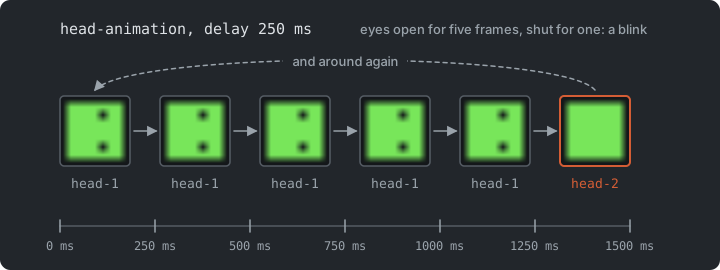
An AnimatedSprite is a Sprite that accumulates elapsed time in Update() and advances
to the next frame when the delay has passed (Snake3).
Try it (Snake2 and Snake3): make the head bigger and spin it the other way, then
remove CenterOrigin() and explain what changes. In the XML only, make the food pulse twice
as fast and the head blink twice as often.
The Room
Section titled “The Room”Step Snake4
The room is data too. A tilemap definition lists which tile of the atlas goes in each cell. The tileset is nine tiles, three by three: the frame’s corners and sides around an empty floor tile in the middle.
<Tilemap> <Tileset region="0 16 24 24" tileWidth="8" tileHeight="8">images/atlas</Tileset> <Tiles> 00 01 01 01 01 01 … 01 01 01 01 02 03 04 04 04 04 04 … 04 04 04 04 05 03 04 04 04 04 04 … 04 04 04 04 05 ... 06 07 07 07 07 07 … 07 07 07 07 08 </Tiles></Tilemap>GARCore’s Tilemap.FromFile reads it into a flat array of tile numbers, one per cell, row
after row. The cell in column x and row y is at index y * Columns + x. To draw the room,
the tilemap goes through the array and draws each tile’s region at a position worked out from
its index. A sprite keeps its own position, but a tile gets its position from the grid.
Every tile comes from the same texture, so the whole room goes to the graphics card in one
batch. A big level would only draw the cells on screen.
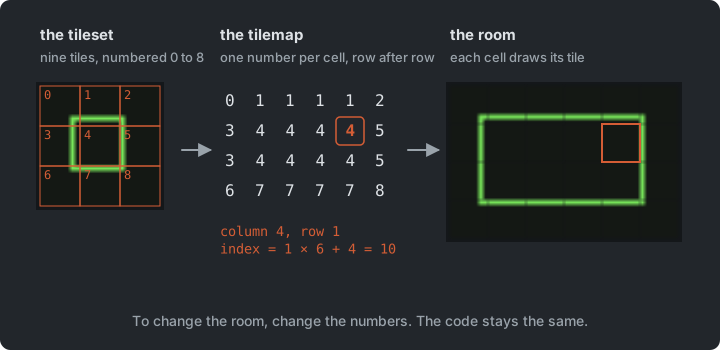
Here the tilemap is only a picture, and the walls are the cells outside the room’s
Rectangle. In Sokoban, the grid becomes the game’s state itself.
Try it (Snake4): rearrange the room in tilemap-definition.xml. Then put a 9 in it,
a tile the tileset doesn’t have (its tiles are 0 to 8): what happens, and when?
Fixed-Tick Movement
Section titled “Fixed-Tick Movement”Step Snake5
A snake doesn’t glide. It jumps one cell at a time, several times per second, however fast
the game runs. The Snake class keeps its body as a list of cells (head first), and
moves on a fixed tick:
private static readonly TimeSpan TickDuration = TimeSpan.FromMilliseconds(100);
public void Update(GameTime gameTime){    // Collect the time since the last move, and move once for every full tick.    _elapsed += gameTime.ElapsedGameTime;    while (_elapsed >= TickDuration)    {        _elapsed -= TickDuration;        Move();    }}
This is the fixed timestep from Pong in
practice. An accumulator collects real time, and the simulation advances in fixed-size
steps. Subtracting (instead of resetting _elapsed to zero) keeps the leftover time, so the
ticks stay evenly spaced.
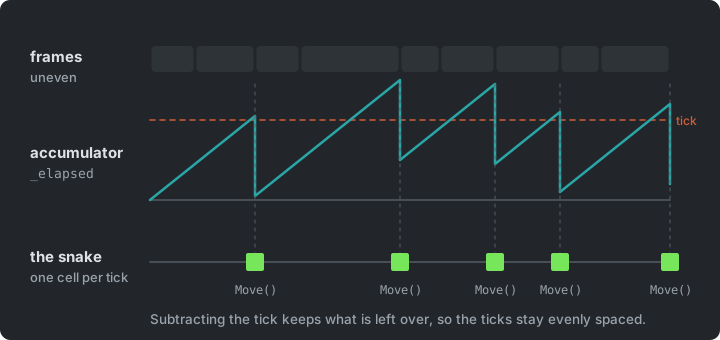
Moving is cheap on a grid. Add a new head in the current direction and remove the tail.
The head has a sprite of its own, and its Rotation turns it to face the direction the
snake moves in. It turns around its centre, so it is drawn at its cell’s corner plus its
origin:
_head.Rotation = MathF.Atan2(_direction.Y, _direction.X);_head.Draw(spriteBatch, CellPosition(Head) + _head.Origin);Input as Actions
Section titled “Input as Actions”Steps Snake5 → Snake6
In Snake5, the game reads the keys directly:
if (Input.Keyboard.WasKeyJustPressed(Keys.W)){ _snake.Turn(Direction.Up);}Physical keys are hardwired to what they do. Supporting the arrow keys too, a gamepad, or letting the player choose their keys means finding every place that reads a key.
In Snake6, a GameController maps keys to the game’s actions. The rest of the game
asks whether the player wants to go up, never which key was pressed:
public static class GameController{    public static bool Up => WasPressed(Keys.W) || WasPressed(Keys.Up);    public static bool Down => WasPressed(Keys.S) || WasPressed(Keys.Down);    public static bool Left => WasPressed(Keys.A) || WasPressed(Keys.Left);    public static bool Right => WasPressed(Keys.D) || WasPressed(Keys.Right);
    private static bool WasPressed(Keys key) => Core.Input.Keyboard.WasKeyJustPressed(key);}
Now the controls live in one place. In Sokoban, we go one step further and turn each action into an object.
Input Buffering
Section titled “Input Buffering”Step Snake7
The snake moves right. Quickly press Up, then Left, before the next tick. In Snake6, the
second key press overwrites the first, and the snake turns straight back into its own neck.
Input happens every frame, but the snake only acts on a tick, so key presses can be lost
between ticks.
Snake7 buffers the turns in a queue, and each tick uses one:
public void Turn(Point direction){    Point current = _turns.Count > 0 ? _turns.Last() : _direction;
    if (_turns.Count < MaxBufferedTurns && direction != current && direction != Opposite(current))    {        _turns.Enqueue(direction);    }}
A new turn is checked against the last buffered direction, so no combination of quick key presses can reverse the snake. The buffer is kept short (two turns), so the snake never acts on presses the player has long forgotten.
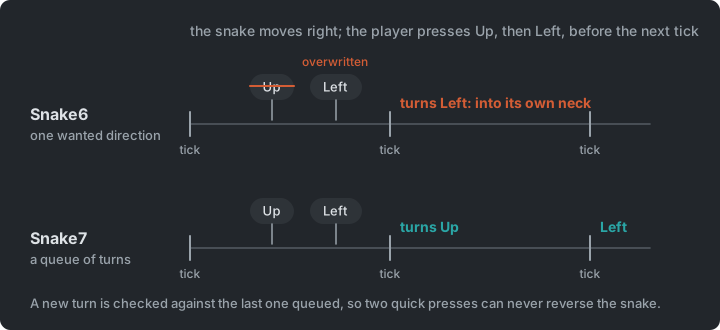
Many games buffer input like this, so that a jump pressed just before landing, or a combo pressed slightly early, still counts.
Try it (Snake7): make the snake twice as fast, and add I, J, K and L as a third set
of keys. Which file did each change need? Then press two turns within one tick, in Snake6
and in Snake7. What does the snake do in each?
Eating & Growing
Section titled “Eating & Growing”Step Snake8
Food sits on one cell of the room. When the snake’s head reaches it, the snake eats it,
grows, and new food appears on a free cell. Each bite adds a point to the score under the
room. Its digits are regions of the atlas too (digit-0 to digit-9), so even the score’s
font is data.
Collision detection
Section titled “Collision detection”To know when the head reaches the food, the game has to check whether two things touch. That is collision detection, and it starts with choosing a shape for each thing:
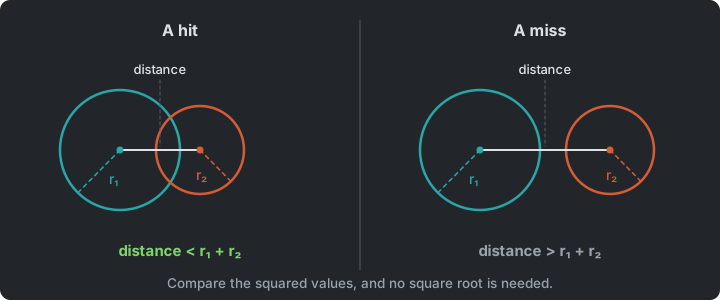
- Circles: two circles overlap if the distance between their centres
is less than the sum of their radii. Compare squared values
(
Vector2.DistanceSquared) to avoid a square root. - AABB: built into MonoGame as
Rectangle.Intersects()andRectangle.Contains()(see Pong).
Which shape to use is a trade between speed and precision. Circles fit round and rotating things, and rectangles fit boxes and tiles; both are cheap. Polygons follow a sprite’s outline closely, but cost more to check and to write. Use the simplest shape that looks right to the player. A grid lookup, as in Super Mario Bros, is cheaper still, but only works for things that stay in their cell.
MonoGame has no circle type, so GARCore has a Circle struct with Intersects(Circle).
Both the snake’s head and the food expose their Bounds as a Circle. The food stays in
its cell, so comparing cells would work here too; circles also work for things that move
freely, which the later games need.
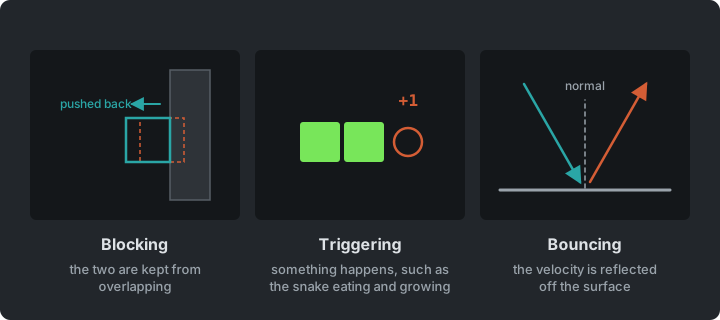
Collision response
Section titled “Collision response”Collision response is what happens after a hit:
- Blocking: the two are kept from overlapping, as a wall stops the player in Super Mario Bros.
- Triggering: something happens. The snake eats the food and grows. On its next move, it keeps its tail.
- Bouncing: reflect the velocity off the surface, as the ball does in Pong.
Vector2.Reflectdoes it for any angle, given the surface’s normal.
Many objects
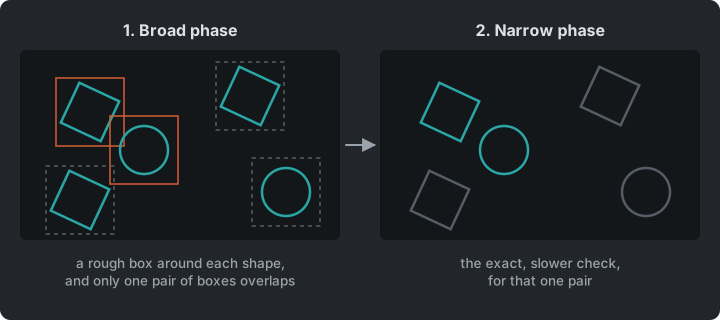
Section titled “Many objects”Snake checks one head against one piece of food. With many moving objects, every pair has to be checked: n objects make n × (n − 1) / 2 pairs, so 100 objects are 4,950 checks every frame. Engines split the work in two. A broad phase finds the pairs that are near each other with something cheap and rough, and a narrow phase runs the exact check on those pairs only. Vampire Survivors builds a broad phase from a grid.
Game Over
Section titled “Game Over”Step Snake9
Until now, the snake wrapped around to the other side of the room. In Snake9, the walls
and the snake’s own body are deadly. Both are grid checks, without any shapes:
// Hitting a wall or its own body ends the game, and a new one starts.if (!_room.Contains(_snake.Head) || _snake.IsBitingItself){ _snake.Reset(_room.Center); _score = 0; _food.MoveToFreeCell(_snake);}The Whole Game
Section titled “The Whole Game”Step Snake9
Snake9 is the finished game. Game1 holds the room, the snake and the food, and applies
the rules between them, which are eating, scoring and game over. The snake and the food
draw themselves with sprites from the one atlas.
classDiagram
    Core <|-- Game1
    Game1 --> Tilemap : the room
    Game1 --> Snake
    Game1 --> Food
    Game1 ..> GameController : asks for actions
    Snake --> AnimatedSprite : head
    Snake --> Sprite : body
    Food --> AnimatedSprite
    TextureAtlas ..> Sprite : creates
    TextureAtlas ..> AnimatedSprite : creates
Tilemap, TextureAtlas, Sprite and AnimatedSprite are GARCore classes, and the XML
files fill them. The other classes in the diagram belong to this game.
Summary
Section titled “Summary”| Concern | Answer |
|---|---|
| What the art and the room look like | XML files that the code reads |
| Many images in few draw calls | A texture atlas with named regions |
| Movement in steps | A fixed tick, kept by an accumulator |
| Which key does what | Actions, in one GameController |
| Key presses between two ticks | An input buffer |
| What happens after a hit | Blocking, triggering or bouncing |
Exercises
Section titled “Exercises”Start from Snake9.
- A bug from data: the atlas image also holds a bug (an insect, as another thing to
eat) that the game doesn’t use yet, with two 7 × 7 frames at (40, 0) and (48, 0). Describe
it in
atlas-definition.xml(two regions and abug-animation), and make the snake eat a bug instead of the food. How much C# did you need to change? And for a bug next to the food: what inGame1would have to change, and what does that say about where the food’s rules live? - Speed up: make the tick shorter each time the snake eats, down to a minimum. Where does that rule belong?
- New input: add gamepad support for the D-pad. A press needs last frame’s state, so
first add a
GamePadInfoto GARCore’sInputManager, modelled onKeyboardInfo(Corealready updates theInputManagerevery frame). Then map the D-pad inGameController. Which files in the game itself did you change? - Pause: add a pause action. While paused, the snake doesn’t move and turns aren’t buffered. Which class knows the key, and which one decides that the snake stands still?
- Refactor (stretch): the tick timer lives in
Snake. Move it into a reusableFixedTimerclass in GARCore that calls back on every tick, and use it for the snake.
Apply It to Your Project
Section titled “Apply It to Your Project”- Which of your game’s assets and settings are hardcoded, and could live in data files?
- What are the actions in your game? List them separately from the keys and buttons that trigger them.
- Does anything in your game happen on a fixed tick?
Check Yourself
Section titled “Check Yourself”Why prefer a texture atlas over many individual image files?
Drawing from one texture lets SpriteBatch batch many sprites into few draw calls. Switching textures between draws breaks the batch and costs performance.
Why subtract the tick duration from the accumulator instead of resetting it to zero?
The leftover time carries over to the next tick. Resetting it would throw away a bit of time every tick, so the ticks would drift and depend on the frame rate.
What problems come from reading the keyboard directly inside gameplay code?
Keys are hardcoded throughout the game, so rebinding, supporting a gamepad or letting an AI drive the same entity means editing gameplay code in many places.
Why check a buffered turn against the last buffered direction?
The snake only turns on the next tick. Checking against its current direction would allow two quick turns that together reverse it into its own neck.
What do you gain by describing assets in data files?
A new sprite, animation frame or room is an edit to a file, made without touching the code, and the code stays smaller and more general. The builder copies the XML files as they are, because our own code reads them when the game runs.