
 0/12
0/12 0/12
0/1204 Sokoban
Today’s Goal

Section titled “Today’s Goal”Make a box-pushing puzzle game, like Sokoban: push every box onto a goal. You can only push, never pull, and only one box at a time.
Snake’s grid was a picture with a snake on top. In Sokoban the grid is the whole game. The walls, the boxes and the player are all the state there is, which makes it a good game for learning the Command pattern. Every move becomes an object, so it can be undone, replayed, or bound to a different key.
Before we get to commands, we load the levels from plain text files and keep the rules apart from the drawing. That lets us write our first unit tests, which check the rules without starting the game.
Source code: gar-games/04-sokoban
Prepare
Section titled “Prepare”- Command (the whole chapter, including undo and redo)
- No required reading on testing. This session introduces it from the start.
- Optional: Command (Refactoring Guru), the same pattern with a class diagram and an example outside games
- Optional: Unit testing C# with xUnit (Microsoft), a walkthrough of a first test project, for after the session
Levels as Data
Section titled “Levels as Data”Step Sokoban0
Sokoban levels have been written as text for decades, one character per cell:
######## ## @$ .## ########| Character | Meaning |
|---|---|
# |
Wall |
$ |
Box |
. |
Goal |
* |
Box on a goal |
@ |
Player |
+ |
Player on a goal |
The format is small, readable, and easy to edit in any text editor. As in Snake, the builder copies the files as they are, and our own code reads them:
content.IncludeCopy<WildcardRule>("*.txt");using Stream stream = TitleContainer.OpenStream(Path.Combine(Content.RootDirectory, "levels/level1.txt"));Sokoban0 draws the level straight from the text, picking a tile for each character. It
works, but the text is the only state. To move the player, we would have to edit
characters in strings, and every question (“is there a wall here?”, “is the level
solved?”) would be a question about characters.
Try it (Sokoban0): add a second box, a second goal and a wall in the middle of
level1.txt. What must be true for a level to be playable?
Rules Apart From Drawing
Section titled “Rules Apart From Drawing”Step Sokoban1
Sokoban1 reads the text once, into a Level: walls, goals, boxes and the player. Level
holds the state and the rules. It knows nothing about textures, keys or the screen.
classDiagram
    class Game1 {
        -Level _level
        -LevelView _view
        #Update(gameTime)
        #Draw(gameTime)
    }
    class Level {
        +Point Player
        +IReadOnlyCollection~Point~ Boxes
        +bool IsSolved
        +Parse(text)$ Level
        +IsWall(cell) bool
        +HasBox(cell) bool
        +CanMove(direction) bool
        +Move(direction) MoveResult
    }
    class LevelView {
        +Point Facing
        +Draw(spriteBatch, level)
    }
    class GameController {
        +bool Up$
        +bool Down$
        +bool Left$
        +bool Right$
    }
    Game1 --> Level
    Game1 --> LevelView
    Game1 ..> GameController
    LevelView ..> Level : reads
The rules of a move fit in one method:
public bool CanMove(Point direction){    Point next = Player + direction;    if (IsWall(next))    {        return false;    }
    // A box can be pushed if the cell behind it is free.    if (HasBox(next))    {        Point behind = next + direction;        return !IsWall(behind) && !HasBox(behind);    }
    return true;}
public MoveResult Move(Point direction){    if (!CanMove(direction))    {        return MoveResult.Blocked;    }
    Player += direction;
    if (HasBox(Player))    {        _boxes.Remove(Player);        _boxes.Add(Player + direction);        return MoveResult.Pushed;    }
    return MoveResult.Walked;}
public bool IsSolved => _boxes.All(_goals.Contains);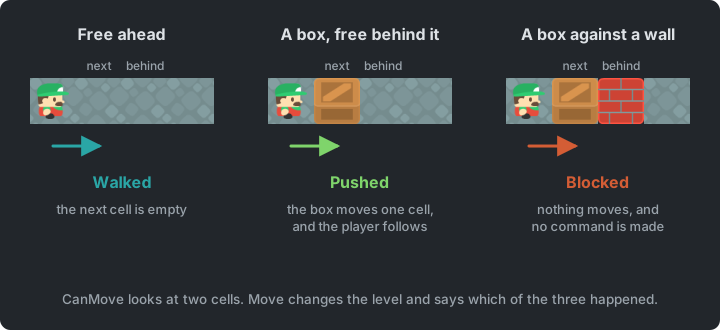
LevelView draws a level, but never changes it. Which way the player faces is only about
drawing, so it lives in LevelView. The GameController is the one from
Snake.
With the two apart, each can change on its own. New art only touches LevelView, and a
new rule only touches Level. The rules can also be tested, as the next section shows.
Try it (Sokoban1): make the walls look like floor, and make a level count as solved
when all boxes but one are on goals. Which class did each change need?
Unit Tests
Section titled “Unit Tests”Project Sokoban.Tests
So far, the only way to check the rules is to play. You start the game, walk into a box, and look. That is slow, it is easy to skip a case (a box against another box?), and every change to the code means playing it all again.
A unit test is a small piece of code that checks one thing about your code automatically. It sets up a situation, does one thing, and checks the result. A test passes or fails, and hundreds of them run in about a second. Whenever you change the code, you run the tests again, and they tell you at once if something that used to work is now broken.
A test needs code that can be tested
Section titled “A test needs code that can be tested”Try to test a rule written inside Game1.Update. To call it, you would need a window, a
graphics device, the content, and a real key press. The split in Sokoban1 matters
because Level needs none of those. A test can create a level from a string and move the
player with a method call.
The test project
Section titled “The test project”Tests live in their own project, Sokoban.Tests, next to the game. It’s a class library
that references the game project, plus three packages:
<ItemGroup> <!-- The test framework (xunit), and what lets dotnet test and editors find and run the tests. --> <PackageReference Include="Microsoft.NET.Test.Sdk" Version="17.*" /> <PackageReference Include="xunit" Version="2.*" /> <PackageReference Include="xunit.runner.visualstudio" Version="3.*" /></ItemGroup><ItemGroup> <!-- The code under test: the finished game. --> <ProjectReference Include="..\Sokoban4\Sokoban4.csproj" /></ItemGroup>xUnit is a test framework: it finds your tests, runs them, and reports the results. The game itself knows nothing about the tests; they are never part of the game you ship.
Anatomy of a test
Section titled “Anatomy of a test”public class LevelTests{ private const string Corridor = """ ####### # @$ .# ####### """;
[Fact] public void Walking_into_a_box_pushes_it() { // Arrange: set up the situation Level level = Level.Parse(Corridor);
// Act: do one thing MoveResult result = level.Move(Direction.Right);
// Assert: check the result Assert.Equal(MoveResult.Pushed, result); Assert.Equal(new Point(3, 1), level.Player); Assert.Equal([new Point(4, 1)], level.Boxes); }}[Fact]marks a method as a test. xUnit runs every method marked with it.- The name says what the test checks, in plain words. When a test fails, its name is the first thing you see.
- Arrange, act, assert: most tests have these three parts. Keep them short, with one situation and one action.
Assert.Equal(expected, actual)fails the test when the two values differ. There are others, likeAssert.TrueandAssert.False.
The corridor level is written right in the test, in the same text format as the level files. Each test builds the small level it needs, so it’s clear what is being tested.
Running the tests
Section titled “Running the tests”In the 04-sokoban folder, run dotnet test:
Passed! - Failed: 0, Passed: 12, Skipped: 0, Total: 12, Duration: 56 ms - Sokoban.Tests.dll (net10.0)Your editor can run them too, and shows each test with a green or red mark: the Test Explorer in Visual Studio, the Unit Tests window in Rider, or the Testing view in VS Code (with the C# Dev Kit).
Now break a rule on purpose. Say a change in Level.Move puts the pushed box in the wrong
cell:
Failed Sokoban.Tests.LevelTests.Walking_into_a_box_pushes_it [6 ms]  Error Message:   Assert.Equal() Failure: Collections differExpected: [{X:4 Y:1}]Actual:   [{X:5 Y:1}]  Stack Trace:     at Sokoban.Tests.LevelTests.Walking_into_a_box_pushes_it() in ...\LevelTests.cs:line 70
Failed!  - Failed:     1, Passed:    11, Skipped:     0, Total:    12
The test names the rule that broke, what it expected, what it got, and the line. You didn’t have to play the game to find it.
Try it (Sokoban.Tests): run dotnet test in the 04-sokoban folder. Copy one test in
LevelTests.cs and make it check walking left, then make it fail on purpose and read the
message.
What to test
Section titled “What to test”Test the rules, the code that decides what happens. In Sokoban, that’s moving, pushing, being blocked, solving a level, and (later) undo and redo. Don’t unit-test drawing. Whether a level looks right is easier to check by looking at it.
Sokoban.Tests tests the finished game, Sokoban4. The tests for Level would work on
Sokoban1 just as well, since the rules haven’t changed since then. When undo arrives in
Sokoban3, the old tests keep checking that moving still works while we change the code
around it.
The Command Pattern
Section titled “The Command Pattern”Step Sokoban2
In Sokoban1, a key press calls _level.Move(direction) directly, and the move is gone
the moment it’s done. The Command pattern turns a request into an object:
Encapsulate a request as an object, thereby letting users parameterize clients with different requests, queue or log requests, and support undoable operations. (Design Patterns, Gamma et al.)
classDiagram
    class ICommand {
        <<interface>>
        +Execute()
    }
    class MoveCommand {
        -Level level
        -Point direction
        +Execute()
    }
    ICommand <|.. MoveCommand
    MoveCommand --> Level
public class MoveCommand(Level level, Point direction) : ICommand{ public void Execute() => level.Move(direction);}private void Move(Point direction){ _view.Facing = direction; if (!_level.CanMove(direction)) { return; }
ICommand command = new MoveCommand(_level, direction); command.Execute(); _moves.Add(command);}Only moves that change something become commands. Walking into a wall is not a move.
A move that is an object can be kept. Sokoban2 only keeps a list, to count the moves
(shown in the window title), but once moves are objects they can also be:
- Queued: executed later, for example one per tick or after an animation.
- Logged and replayed: a list of commands can be played back as a replay, or shown as a solution.
- Sent: over the network, in a multiplayer game.
- Undone: if a command knows how to reverse itself.
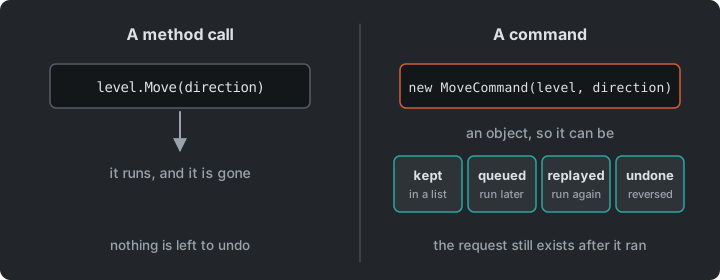
The GameController from Snake maps keys to actions
(“the player wants to go up”). A command is what the game does with an action (“move the
player up in this level”), and that is the object we keep.
Try it (Sokoban2): give MoveCommand a Direction property and show the last
move’s direction in the window title. To undo a move, what else would it need to remember?
Undo and Redo
Section titled “Undo and Redo”Step Sokoban3
To be undone, a command must remember enough to reverse what it did. Moving the player
back is not enough, because if the move pushed a box, the box must be pulled back too.
MoveCommand therefore remembers the MoveResult:
public class MoveCommand(Level level, Point direction) : ICommand{    private MoveResult _result;
    public void Execute() => _result = level.Move(direction);
public void Undo() => level.UndoMove(direction, _result);}public void UndoMove(Point direction, MoveResult result){ if (result == MoveResult.Pushed) { _boxes.Remove(Player + direction); _boxes.Add(Player); }
if (result != MoveResult.Blocked) { Player -= direction; }}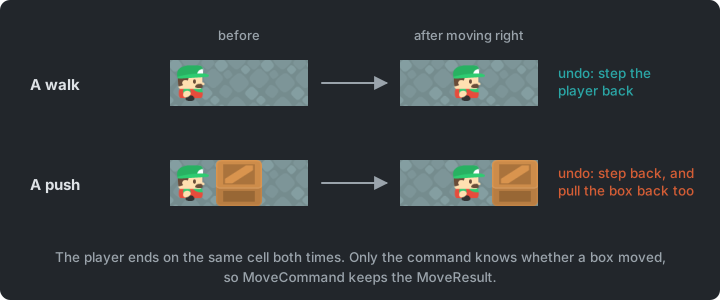
A CommandHistory executes commands and keeps two stacks: what was done, and what was
undone.
public void Execute(ICommand command){    command.Execute();    _done.Push(command);
    // A new command starts a new future: what was undone can no longer be redone.    _undone.Clear();}
public void Undo(){    if (_done.TryPop(out ICommand command))    {        command.Undo();        _undone.Push(command);    }}
public void Redo(){    if (_undone.TryPop(out ICommand command))    {        command.Execute();        _done.Push(command);    }}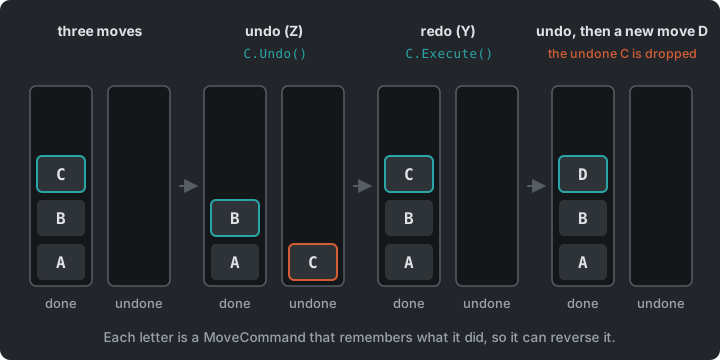
Z undoes and Y redoes. The move counter is now the number of commands on the
undo stack. UndoTests.cs in Sokoban.Tests checks that undo and redo bring back
the level as it was.
There are two ways to undo:
- Reverse the command (as here): each command knows its own opposite. It’s cheap, but every command must get its undo right.
- Save snapshots: store a copy of the state before each command, and restore it. It’s simple and always correct, but costs memory for large states.
Sokoban’s state is small, so snapshots would work too. In a game with a large world, only the commands’ changes are worth storing.
Commands and input
Section titled “Commands and input”Game Programming Patterns opens its Command chapter with input. Each button holds a command, and rebinding a button means giving it a different one.
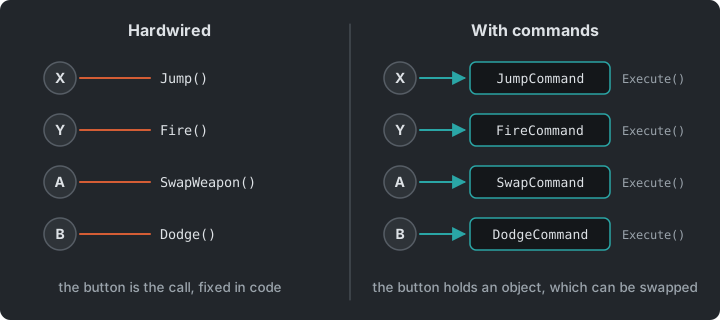
Our GameController already names actions instead of keys, but the mapping is code. To let a
player choose their keys, it has to become data, which the game can change while it runs,
read from a settings file, or fill from an options screen:
private readonly Dictionary<Keys, Point> _moveKeys = new(){    [Keys.Up] = Direction.Up,     [Keys.W] = Direction.Up,    [Keys.Down] = Direction.Down, [Keys.S] = Direction.Down,    [Keys.Left] = Direction.Left, [Keys.A] = Direction.Left,    [Keys.Right] = Direction.Right, [Keys.D] = Direction.Right,};
private void HandleInput(){    foreach ((Keys key, Point direction) in _moveKeys)    {        if (Core.Input.Keyboard.WasKeyJustPressed(key))            Move(direction);    // a new MoveCommand for this move    }    // ...}
A key picks which command to make, but each press still makes a new MoveCommand. The
history keeps every one of them, because each move needs its own object to be undone. The
book says the same about undo: the input handler hands out a new command each time.
Try it (Sokoban4): replace the four move lines in HandleInput with the dictionary. Then
add a key that swaps the up and down bindings while you play. What did you change, and what
didn’t need to know?
The Whole Game
Section titled “The Whole Game”Step Sokoban4
Sokoban4 adds a title screen, seven levels (level1.txt … level7.txt), R to restart a
level, a move counter, and a message when the level is solved. Loading a level parses a new Level and
clears the history. Nothing in the rules or the commands changed.
classDiagram
    Core <|-- Game1
    Game1 --> Level
    Game1 --> LevelView
    Game1 --> CommandHistory
    Game1 ..> GameController : asks for actions
    CommandHistory --> ICommand : done and undone
    ICommand <|.. MoveCommand
    MoveCommand --> Level
    LevelView ..> Level : reads
The rules, the view and the history don’t refer to each other. Game1 connects them, and
a MoveCommand is the only other thing that changes the level.
Summary
Section titled “Summary”| Concern | Answer |
|---|---|
| What a level looks like | A text file, one character per cell |
| Rules that can be tested | Level, kept apart from LevelView |
| Checking the rules | Unit tests that arrange, act and assert |
| A move that can be kept | Command |
| Undo and redo | Two stacks of commands |
| Keys the player can change | A table from keys to moves, held as data |
Exercises
Section titled “Exercises”Start from Sokoban4.
- A new level: design your own level in
level8.txt. To play it, you also have to raiseLevelCountinGame1: how could the game find its levels without that line? Is your level solvable? How do you know? - Two more tests: add tests to
LevelTests.csfor two cases that aren’t tested yet: pushing a box off a goal makes the level unsolved again, and the player can walk onto a goal. Run them. Then breakLevel.Moveon purpose and watch them fail. - Test first: add ice (
~): boxes can’t be pushed onto it, but the player can walk on it. Write the tests before the code, see them fail, then make them pass. The tilesheet already has an ice tile (number 9) forLevelView. - Replay: when a level is solved, replay the solution from the start, one command every 200 ms. How much new code for moving did the replay take?
- Restart as a command: make
Ra command too, so a restart can be undone. What must it remember? - Snapshot undo (stretch): replace
CommandHistorywith a history ofLevelsnapshots. Compare the two for code, memory, and how easy each is to get wrong.
Apply It to Your Project
Section titled “Apply It to Your Project”- Which of your game’s rules could be separated from drawing and input? Write one unit test for one of them.
- Would undo, replays or queued actions be useful in your game? Which actions would become commands, and what would each need to remember?
- Could your levels, or part of them, be data files?
Check Yourself
Section titled “Check Yourself”What does it mean to turn a request into an object, and what does it make possible?
Instead of calling a method directly, you create an object that represents the call. It can then be stored, queued, logged, replayed, sent over the network, or undone, because it still exists after it has run.
Why does a move command have to remember whether it pushed a box?
Undoing a walk only moves the player back. Undoing a push must also move the box back. The level after the move doesn’t tell which one happened, so the command must remember it.
Why is the redo stack cleared when a new command is executed?
The undone commands belong to a different future. After a new move, the state they were made for no longer exists, so redoing them could leave the level in an impossible state.
What is a unit test, and what are its three parts?
A small piece of code that checks one thing about your code automatically. It arranges a situation, acts (does one thing), and asserts that the result is what it should be.
Why can Level be unit-tested, but not code in Game1.Update?
Level only depends on its own data, so a test can create one from a string. Game1
needs a window, a graphics device, content and real key presses.